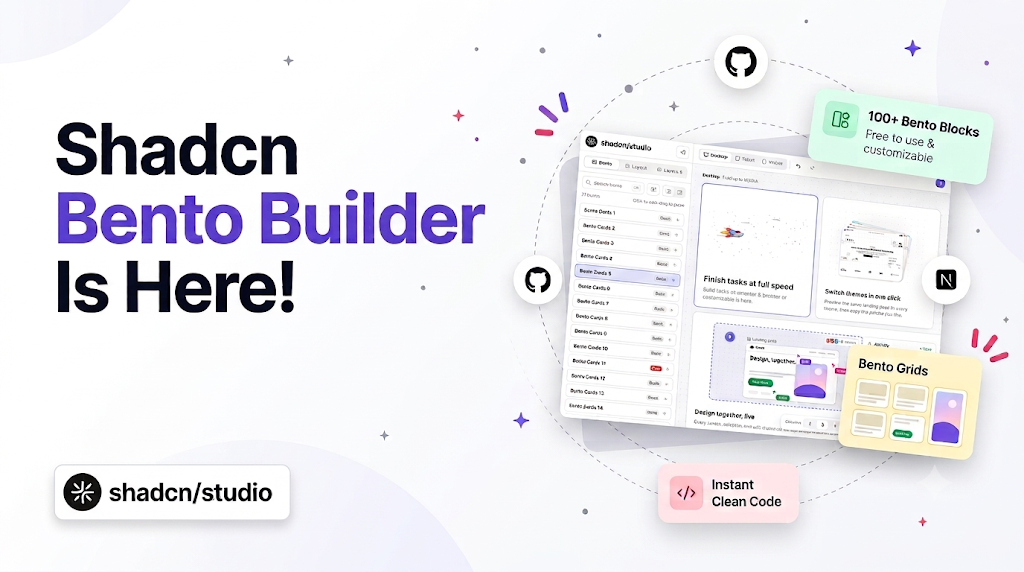
The Shadcn Bento Builder is a drag-and-drop bento grid generator from shadcn/studio. Pick Shadcn bento cards, arrange them as tiles, and export a complete, responsive bento grid as clean React, Tailwind CSS, and shadcn/ui code.
Bento grids are everywhere, from product landing pages to feature sections. They look great, but getting the layout right by hand is rarely quick.
Until now, Shadcn Studio gave developers a growing collection of Shadcn Bento Grid blocks to drop into their projects. But arranging the tiles, balancing the spans, and keeping everything responsive still meant a lot of manual layout work.
Today, we’re introducing the Shadcn Bento Builder to make that part effortless.
What Is the Shadcn Bento Builder?
The Shadcn Bento Builder is a drag-and-drop tool for building complete bento grids visually.
Instead of writing grid classes and tweaking column spans yourself, you pick the cards you need, arrange them as tiles, and put together a finished bento grid or bento section in a fraction of the time.
Every tile is powered by reusable Shadcn Studio blocks, so you’re never locked into a generated layout you can’t touch. The output is built with React, Tailwind CSS, and shadcn/ui, which means you can edit content, change styling, and extend functionality just like any other part of your codebase.
How to Build a Bento Grid with Drag and Drop
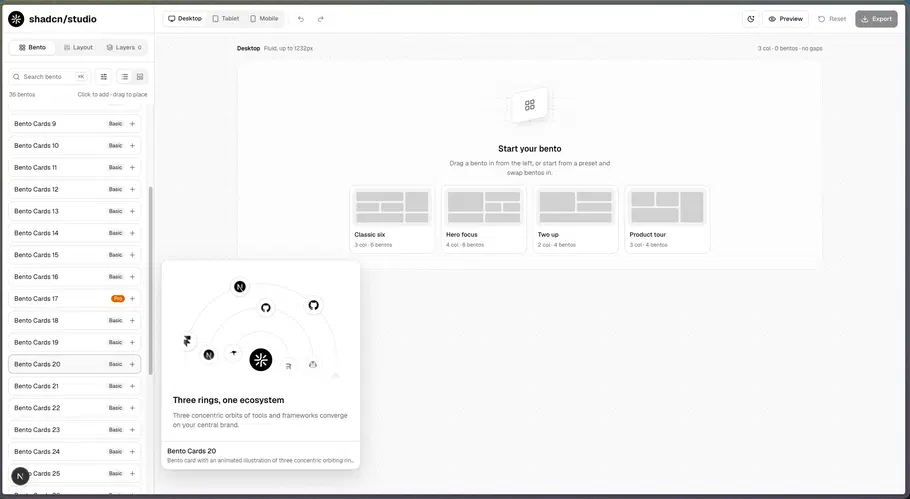
Building a bento grid takes just a few steps.
- Pick your cards: Choose from the bento cards available in Shadcn Studio.
- Arrange your tiles: Drag and drop cards to build the layout that fits your product story.
- Customize the content: Update copy, icons, and styling to match your brand.
- Export clean code: Copy production-ready code straight into your project.
CLI & Export
Click Export in the top header to open the export dialog. It summarizes your grid (number of cards, columns and Base UI) and gives you everything you need to bring it into your project: a single shadcn CLI command and the page code. Click Export in the top header to open the export dialog. It summarizes your grid (number of cards, columns, and Base UI) and gives you everything you need to bring it into your project: a single shadcn CLI command and the page code.
Plan limits:
Export is available when every card on your grid is included in your plan. If the grid contains Basic or Pro cards your plan doesn’t cover, the Export button is disabled and its tooltip explains why. Swap those cards for ones you can use, or upgrade your plan.
Get all access button in the toolbar takes you to pricing.
Install via CLI
On the Code tab, step 1 is one command that installs every card on your grid. Each card is added once, even if you have used it more than once:
npx shadcn@latest add @ss-blocks/bento-cards-01 @ss-blocks/bento-cards-02 @ss-blocks/bento-cards-03Open your terminal in your Next.js + shadcn/ui project and paste the command. The shadcn CLI installs the card files and their dependencies directly into your project.
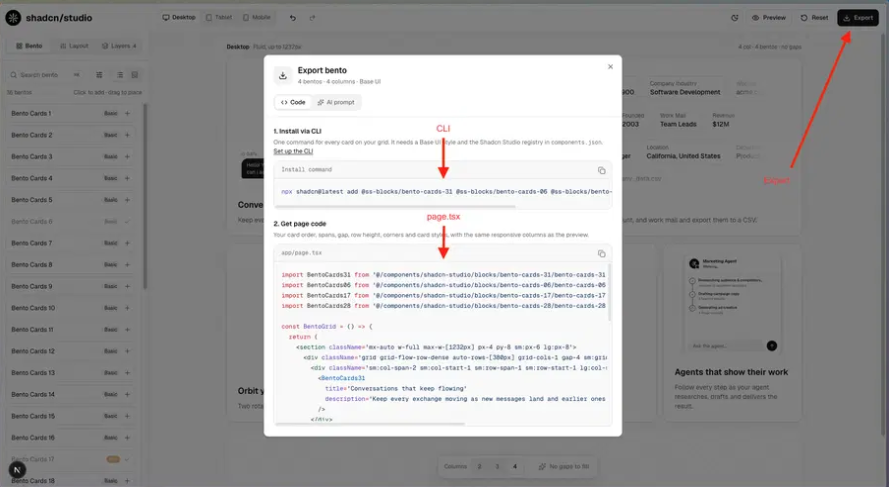
The bento cards are built for a Base UI style, so your components.json needs a Base UI style and the Shadcn Studio registry. Refer to the How to use Shadcn CLI guide for full setup instructions.
Click the copy button on the code block to copy the command.
Works Alongside Bento Grid Blocks
The Bento Builder works hand in hand with the Shadcn Bento Grid blocks.
That means you can combine illustrated bento cards with other tiles to create exactly the layout you have in mind, whether it’s a compact feature highlight or a full-width bento section for your landing page.
Bento Builder vs. Hand-Coding Tailwind Grid Layouts
| Hand-coding a Tailwind bento grid | Shadcn Bento Builder | |
|---|---|---|
| Layout | Write grid classes and column spans yourself | Drag and drop tiles on a visual canvas |
| Responsiveness | Test and tune each breakpoint manually | Responsive layouts across desktop, tablet, and mobile |
| Content | Build every card from scratch | Start from reusable Shadcn Studio blocks |
| Code ownership | Full | Full: standard React, Tailwind CSS, and shadcn/ui |
| Time to a finished section | Hours | Minutes |
Features: Responsive, Customizable, Production-Ready Code
- Build complete bento grids visually instead of hand-coding every layout.
- Combine illustrated bento cards with other tiles in a single grid.
- Customize every tile using standard React and Tailwind CSS.
- Create responsive layouts that work across desktop, tablet, and mobile.
- Keep full ownership of clean, production-ready source code.
- Go from idea to finished bento section in minutes.
Who Is It For?
- SaaS landing pages that need a standout features section.
- AI products showcasing multiple capabilities at a glance.
- Startups and agencies shipping polished marketing pages fast.
- Product updates and launch pages with lots to show in little space.
Supported Frameworks: Next.js, Remix, Astro, Vite
Everything you build with the Bento Builder uses technologies developers already know: React, shadcn/ui, and Tailwind CSS.
The exported code fits naturally into projects built with:
- Next.js
- Remix
- Astro
- Vite
Because it’s all standard React source code, extending or customizing your bento grid feels exactly like working inside your own project.
FAQ
- What is a bento grid?
A bento grid is a layout of tiles in different sizes arranged in a compact grid, similar to a bento box. It’s popular for feature sections and landing pages because it shows many ideas at a glance.
- What is the Shadcn Bento Builder?
It’s a drag-and-drop tool from shadcn/studio that lets you pick bento cards, arrange them as tiles, and export a complete bento grid built from Shadcn Studio blocks.
- Which frameworks does it work with?
The exported code is standard React, Tailwind CSS, and shadcn/ui, so it fits projects built with Next.js, Remix, Astro, and Vite.
- Can I customize the exported code?
Yes. You get clean source code you fully own, so you can edit content, change styling, and extend functionality like any other part of your codebase.
- Is the layout responsive?
Yes. You can create responsive layouts that work across desktop, tablet, and mobile.
Final Thoughts
Bento grids are one of the most effective ways to present features, but they shouldn’t take hours to lay out.
With the Shadcn Bento Builder, you can move from a blank canvas to a polished, production-ready bento section in minutes, while keeping complete control over your code.
Whether you’re launching a SaaS product, an AI app, or your next startup website, Shadcn Studio now gives you an even faster path from idea to launch.
Build a bento grid online with the Shadcn Bento Builder.
Explore more tiles in the Shadcn Bento Grid blocks and Shadcn Bento Cards collections.