A billing interface is where product design meets real financial decisions. Customers need to understand their plan, usage, renewal date, payment method, invoices, and upcoming charges without digging through a confusing account area.
Shadcn/ui makes these interfaces easier to customize because the components live inside your codebase. You can adapt cards, tables, dialogs, tabs, and forms to your billing model while keeping the experience consistent with the rest of your product.
Because most billing resources focus on individual screens and checkout sections, Shadcn blocks are a practical starting point when you want to add billing UI without replacing the rest of your application.
In this guide, we’ve collected the best Shadcn billing templates and related UI blocks for SaaS billing portals, pricing pages, checkout flows, payment methods, invoice generation, shopping carts, and order summaries. Some are complete screens, while others solve one focused part of the billing journey.
Quick Comparison
| Resource | Best For | Stack | Type |
|---|---|---|---|
| Shadcn Order Summary | Order review and tracking | React, Tailwind CSS, Shadcn UI | Free Blocks |
| Billing SDK Billing Screen | SaaS subscription dashboards | React, TypeScript, Shadcn UI | Free / Open Source |
| Shadcnblocks Checkout | Complete ecommerce checkout flows | React, Tailwind CSS, Shadcn UI | Free + Pro |
| Shadcn UI Kit Payment Methods | Payment selection cards | React, TypeScript, Shadcn UI | Premium |
| Creative Tim Billing Blocks | Admin billing and invoice portals | React, TypeScript, Shadcn UI | Free + Pro |
| shadcn-pricing-page | Animated SaaS pricing | Next.js, Shadcn UI, NumberFlow | Free / Source Available |
| Invoify | Invoice creation and PDF export | Next.js, TypeScript, Shadcn UI | Free / Open Source |
| Pricing Page Shadcn | Simple theme-aware pricing | Next.js 14, Shadcn UI, next-themes | Free / Source Available |
| Launch UI Pricing | Polished subscription pricing | React, Tailwind CSS, Shadcn UI | Free + Pro |
| Shadcn Studio Shopping Cart | Cart and pre-checkout experiences | React, Tailwind CSS, Shadcn UI | Free Blocks |
Best Shadcn Billing Templates and UI Blocks
Shadcn Studio Order Summary leads the collection with flexible order review and tracking layouts. The remaining resources cover SaaS billing screens, checkout, payment selection, pricing, invoicing, and ecommerce patterns that can be combined into a broader experience.
Shadcn Order Summary
- Best For:
- Order review and tracking
- Type:
- Free Blocks
- Framework:
- React, Tailwind CSS, Shadcn UI
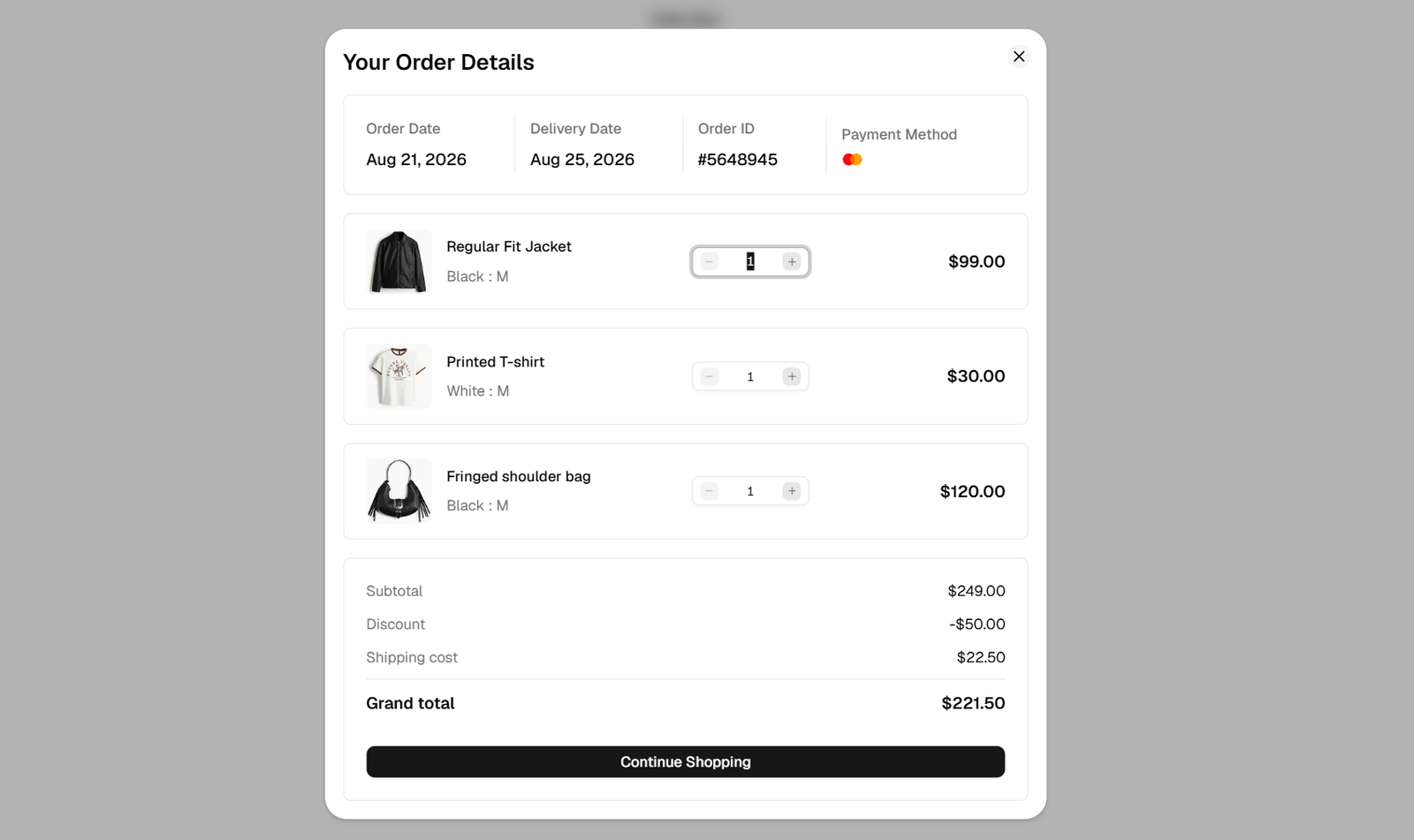
Shadcn Studio Order Summary is a set of ecommerce blocks for showing purchase details before or after payment. The layouts range from a compact summary to a tabbed view with products, customer information, payment and delivery details, tracking timelines, and invoice actions.
These blocks work well in checkout review screens, order confirmation pages, account order history, marketplace dashboards, and receipt views where customers need an itemized and transparent breakdown.
Why Choose Shadcn Studio Order Summary?
- Multiple order-summary layouts
- Useful before and after payment
- Detailed tracking and invoice pattern
- Responsive ecommerce structure
- Figma previews available
Key Features
- Itemized product lists
- Subtotal, tax, shipping, and totals
- Payment and delivery tabs
- Order tracking timeline
- Customer information
- Invoice actions
Keep in Mind: Order summaries display billing and purchase data but do not calculate prices, collect payments, or generate invoices on their own.
Billing SDK Billing Screen
- Best For:
- SaaS subscription dashboards
- Type:
- Free / Open Source
- Framework:
- React, TypeScript, Shadcn UI
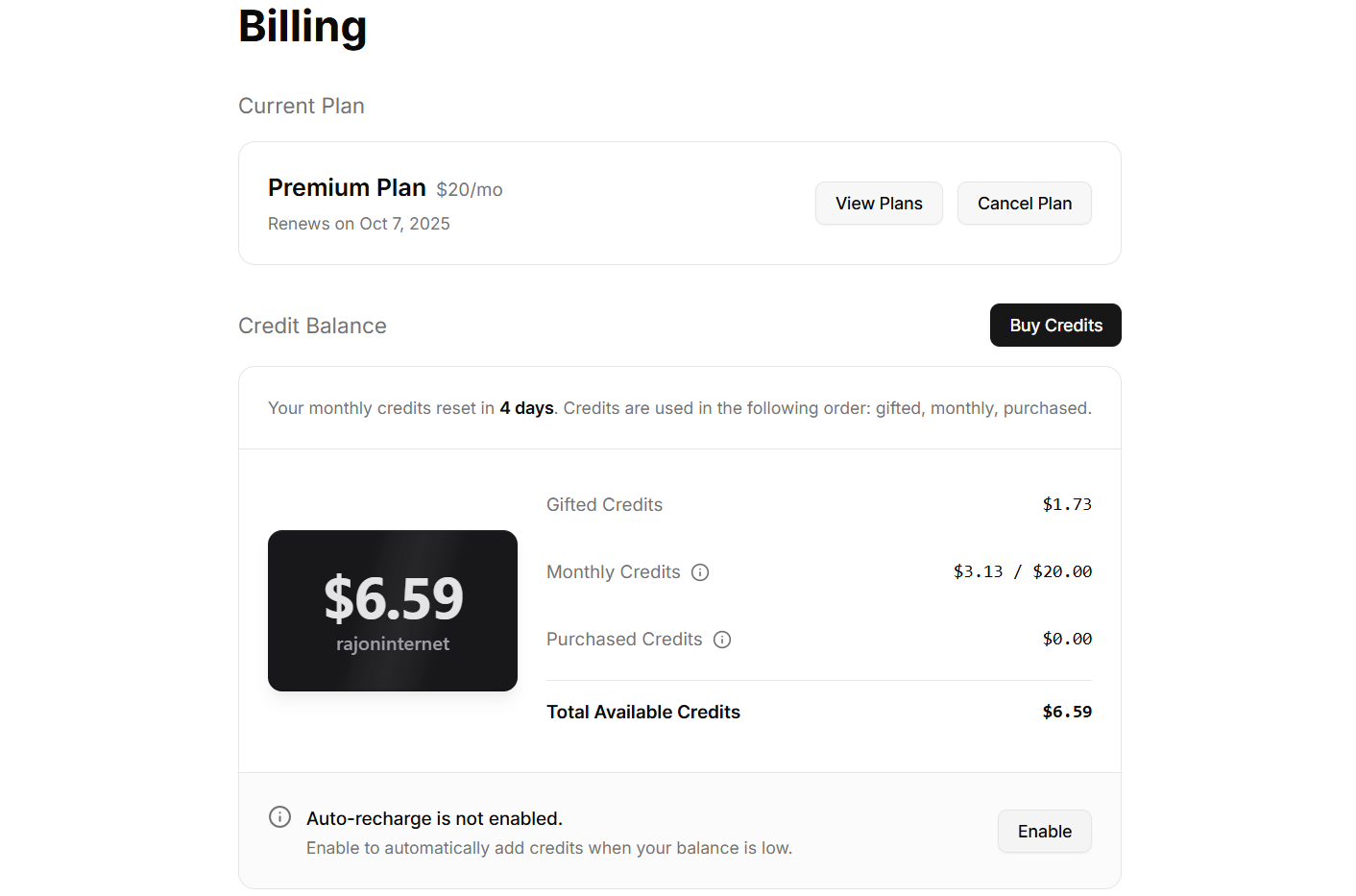
Billing SDK Billing Screen is the most complete account billing interface in this collection. It combines the current plan, monthly price, renewal date, credit balance, usage breakdown, and auto-recharge controls in one responsive dashboard.
The component exposes props for plan and credit data plus callbacks for viewing plans, cancelling, buying credits, and enabling auto-recharge. It can be installed through either the Shadcn CLI or the Billing SDK CLI and themed through Shadcn CSS variables.
Why Choose Billing SDK Billing Screen?
- Complete billing dashboard in one component
- Designed for SaaS and credit-based products
- Clear prop-driven API
- Shadcn CLI installation
- Easy to connect to custom billing logic
Key Features
- Current plan and renewal details
- Gifted, monthly, and purchased credits
- Total credit balance
- Auto-recharge state
- Plan and cancellation actions
- Shadcn theme support
Keep in Mind: The component provides the interface and callbacks. You still need to connect plan, credit, cancellation, and payment actions to your billing backend.
Shadcnblocks Checkout
- Best For:
- Complete ecommerce checkout flows
- Type:
- Free + Pro
- Framework:
- React, Tailwind CSS, Shadcn UI
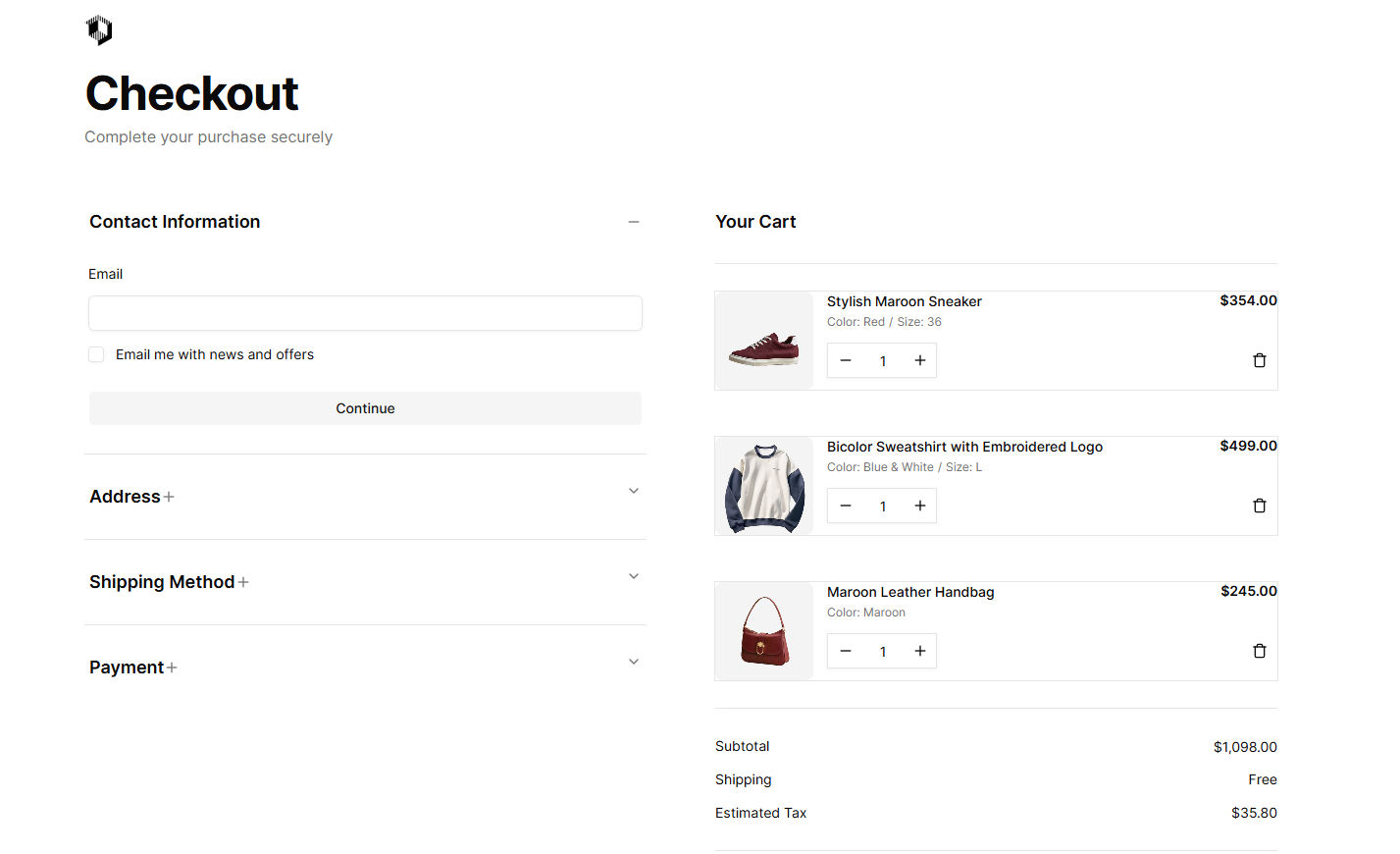
Shadcnblocks Checkout is a collection of eight checkout layouts rather than a single billing screen. The variants include two-column pages, accordion flows, collapsible carts, saved payment methods, progress indicators, address forms, and order review sections.
Each layout is a self-contained React component built with Tailwind CSS and Shadcn UI. Blocks can be copied into a project or installed through the Shadcn CLI, then adapted for Next.js, Remix, Astro, or Vite applications.
Why Choose Shadcnblocks Checkout?
- Eight checkout patterns in one collection
- Covers simple and multi-step flows
- Works across React frameworks
- Copy-paste source ownership
- Light and dark theme support
Key Features
- Cart and address forms
- Payment method selection
- Order review layouts
- Accordion checkout flows
- Saved payment methods
- Shadcn CLI installation
Keep in Mind: Availability varies by block and account tier. These layouts provide checkout UI, not payment processing or server-side order handling.
Shadcn UI Kit Payment Methods
- Best For:
- Payment selection cards
- Type:
- Premium
- Framework:
- React, TypeScript, Shadcn UI
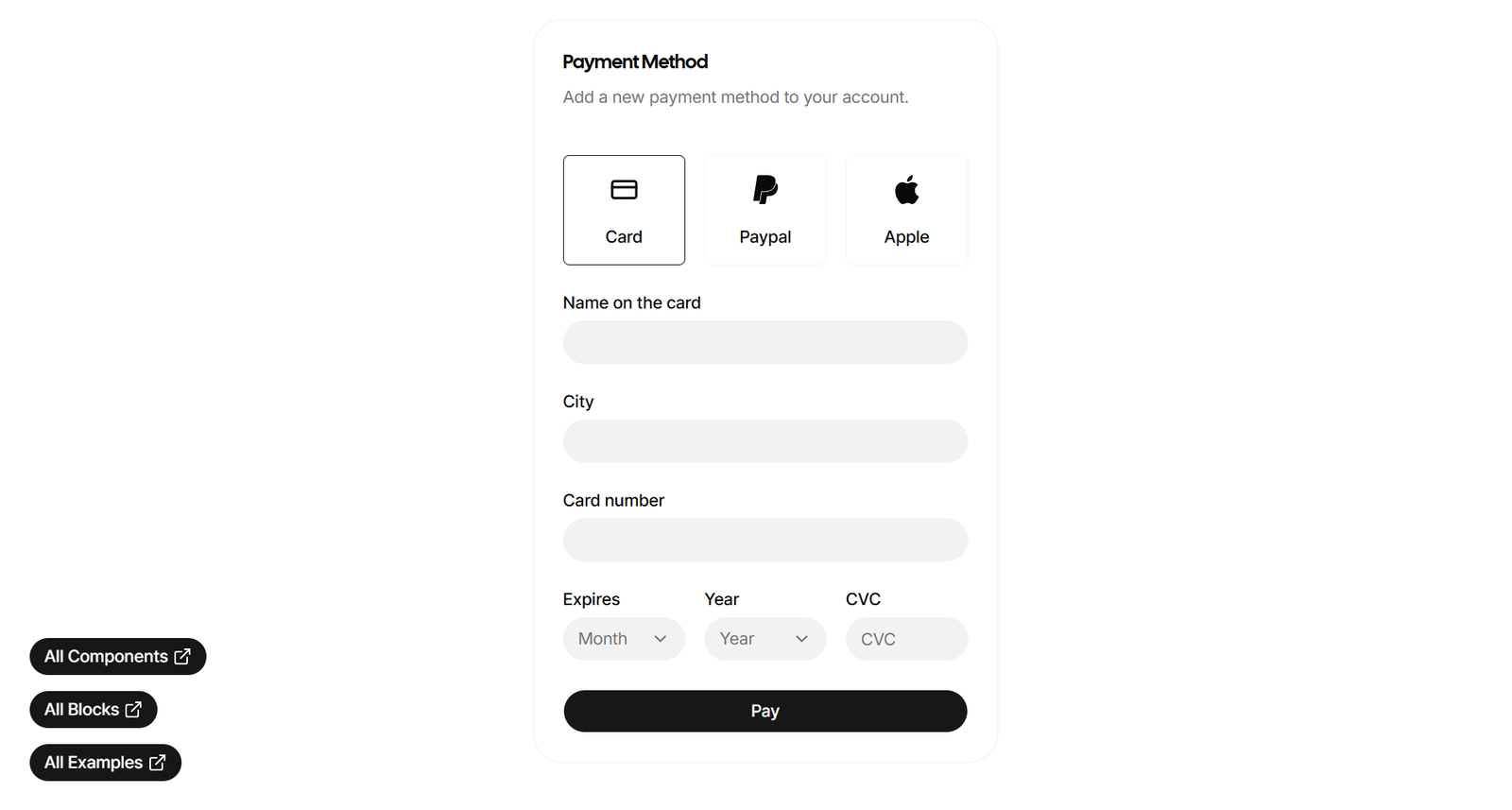
Shadcn UI Kit Payment Methods provides two premium, checkout-ready payment method patterns for displaying card, PayPal, and wallet options. The compact card layouts are useful when the rest of a checkout or billing page already exists and only the payment selector is missing.
The examples follow the visual language of Shadcn cards, badges, and buttons, making them suitable for checkout pages, pricing flows, product pages, and in-app billing settings.
Why Choose Shadcn UI Kit Payment Methods?
- Focused payment selection patterns
- Compact enough for existing layouts
- Polished premium presentation
- Consistent Shadcn styling
- Reusable provider structure
Key Features
- Card payment options
- PayPal and wallet patterns
- Responsive card layouts
- Light and dark previews
- React and TypeScript structure
- Tailwind CSS styling
Keep in Mind: This is a focused UI resource, not a complete billing portal or payment gateway integration.
Creative Tim Billing Blocks
- Best For:
- Admin billing and invoice portals
- Type:
- Free + Pro
- Framework:
- React, TypeScript, Shadcn UI
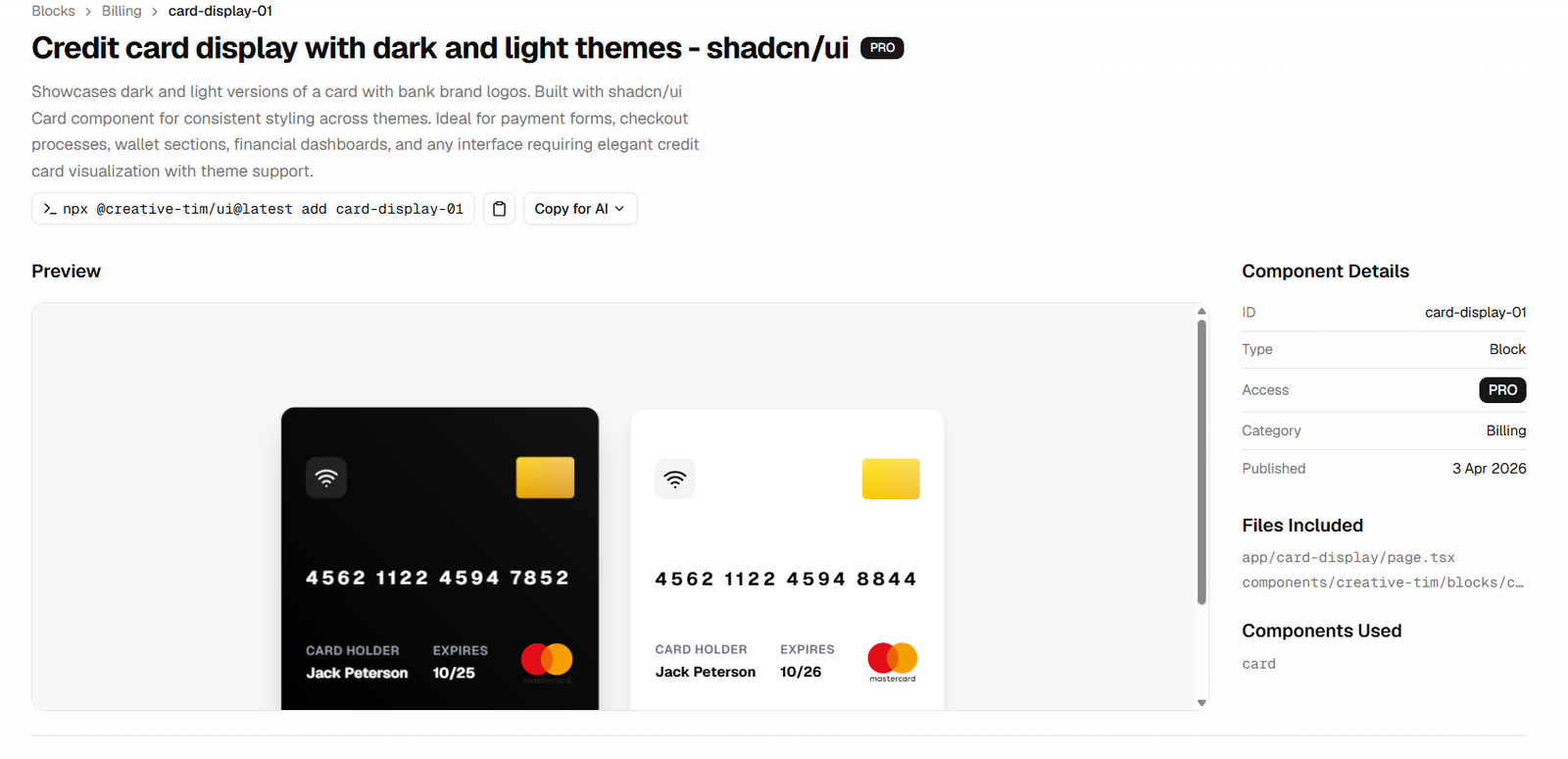
Creative Tim Billing Blocks is an application-focused collection for billing contacts, stored-card displays, transaction history, invoices, and subscription add-ons. Its coverage is especially useful for SaaS dashboards and internal finance tools.
The free billing-information block manages company billing contacts, while premium options add credit-card visuals, invoice status and downloads, and an add-on picker with annual billing controls and a live order summary. Blocks support CLI-based installation through Creative Tim's registry.
Why Choose Creative Tim Billing Blocks?
- Broad admin billing coverage
- Useful for SaaS account portals
- Free and premium options
- Registry and CLI workflow
- TypeScript-first components
Key Features
- Billing contact management
- Credit-card displays
- Transaction history
- Invoice status and downloads
- Billing add-on selector
- Live pricing summary
Keep in Mind: Several advanced blocks are marked Pro, so check the access level of the specific billing pattern you want before planning the implementation.
shadcn-pricing-page
- Best For:
- Animated SaaS pricing
- Type:
- Free / Source Available
- Framework:
- Next.js, Shadcn UI, NumberFlow
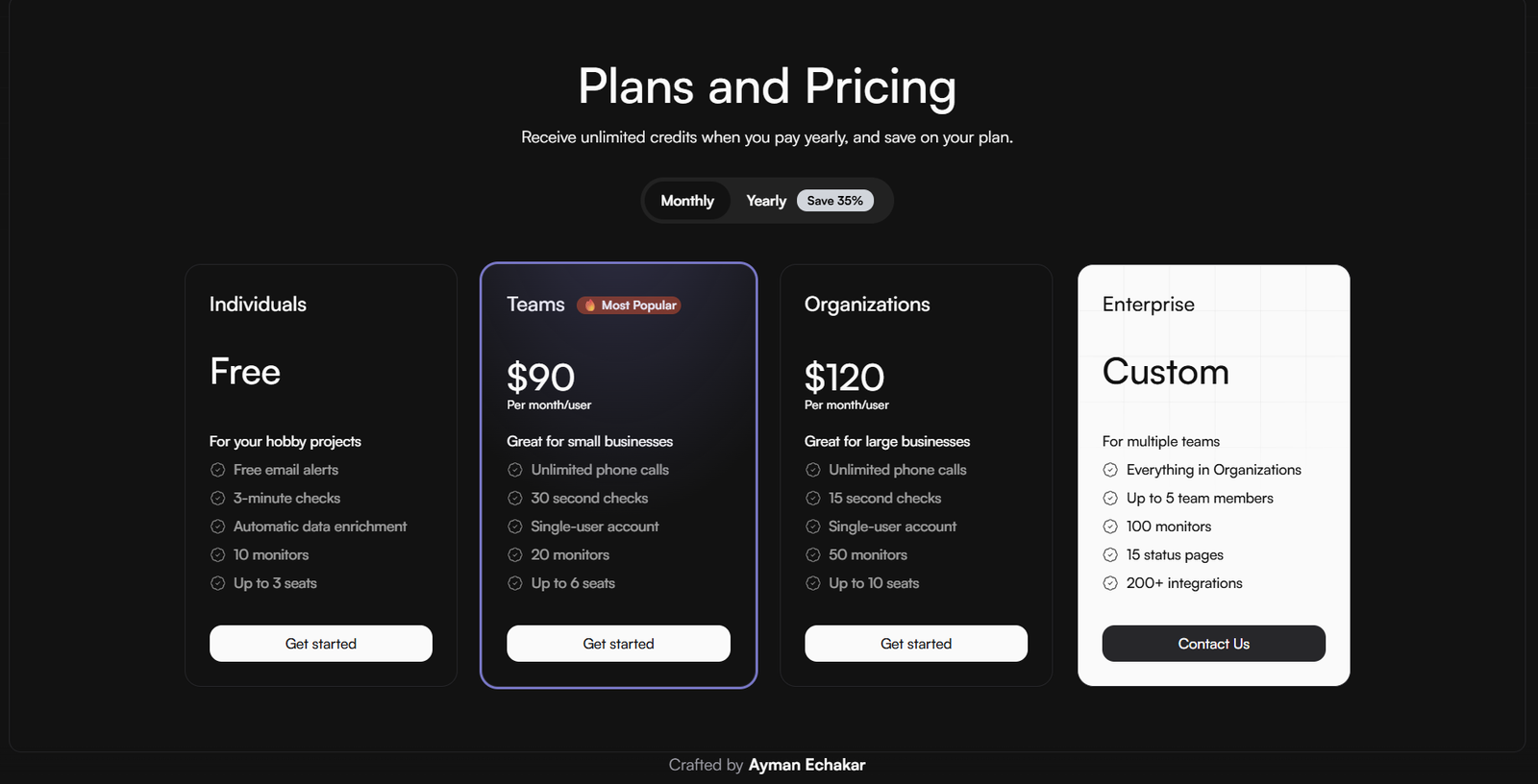
shadcn-pricing-page is a responsive pricing component for SaaS and subscription products. It supports multiple tiers, featured-plan highlights, monthly and yearly billing frequencies, and animated price changes.
The smooth number transitions come from NumberFlow, giving the billing-frequency toggle a more polished feel than a basic text replacement. Its small project structure also makes it approachable when you only need a pricing section rather than a full application template.
Why Choose shadcn-pricing-page?
- Focused, lightweight pricing component
- Polished price transitions
- Responsive tier layout
- Easy plan customization
- Live demo available
Key Features
- Monthly and yearly toggle
- Tiered pricing cards
- Featured-plan highlights
- NumberFlow animations
- Responsive design
- Shadcn UI components
Keep in Mind: The repository does not prominently identify a license. Review its current terms before reusing the source in a commercial project.
Invoify
- Best For:
- Invoice creation and PDF export
- Type:
- Free / Open Source
- Framework:
- Next.js 13, TypeScript, Shadcn UI
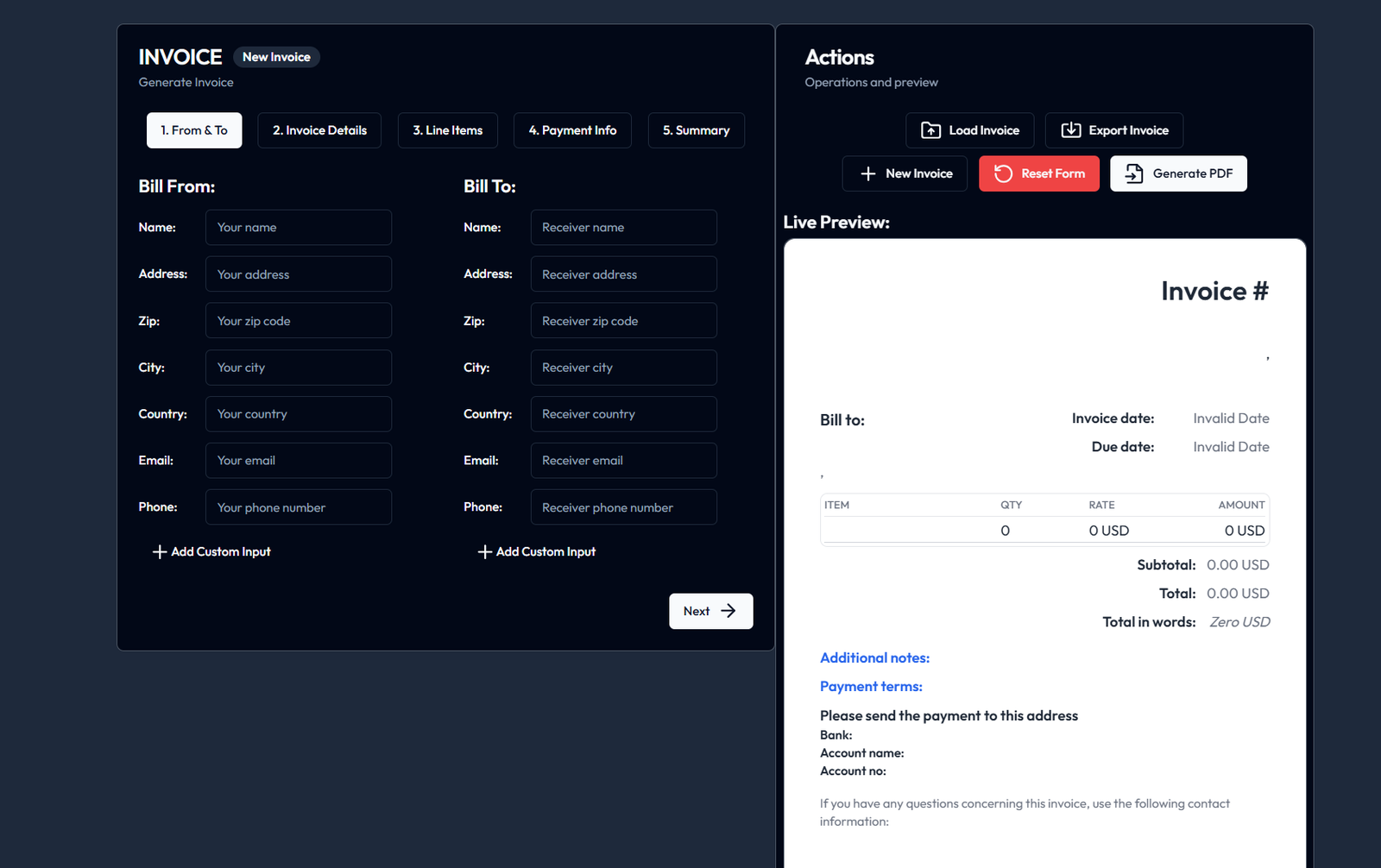
Invoify is a full web-based invoice generator rather than a static billing block. It provides a practical foundation for creating and managing professional invoices with a Shadcn-based interface.
The MIT-licensed project uses Next.js 13, React, TypeScript, and Shadcn UI. It also includes a dedicated invoice service, internationalization structure, and PDF-related tooling, making it the most relevant option here for document-based billing workflows.
Why Choose Invoify?
- Functional invoice application
- Free under the MIT license
- Useful real-world project structure
- Built with familiar Next.js tooling
- Good base for invoice workflows
Key Features
- Invoice creation
- Professional invoice layouts
- PDF generation workflow
- Next.js 13 and TypeScript
- Shadcn UI components
- Internationalization structure
Keep in Mind: Invoify focuses on invoice generation. Recurring subscriptions, payment collection, tax compliance, and accounting integrations require additional services.
Pricing Page Shadcn
- Best For:
- Simple theme-aware pricing
- Type:
- Free / Source Available
- Framework:
- Next.js 14, Shadcn UI, next-themes
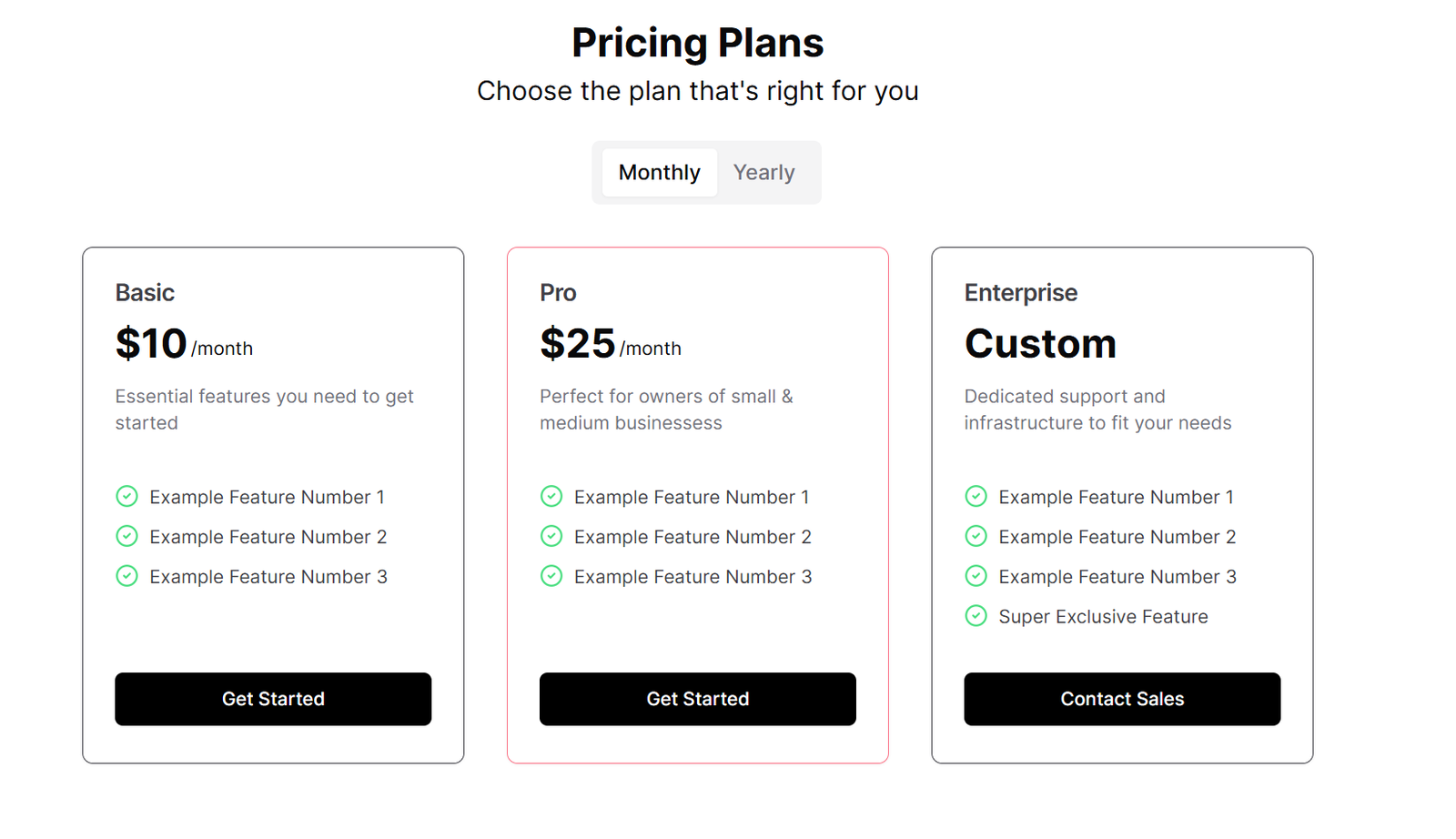
Pricing Page Shadcn is a compact Next.js 14 pricing template built from Shadcn UI cards, buttons, tabs, and dropdown menus. It is a straightforward starting point for displaying subscription tiers without bringing in a larger marketing template.
The page supports light, dark, and system themes through next-themes and automatically adapts its Shadcn styling to the active theme. Its limited scope makes it easy to understand and reshape around a product's own plans.
Why Choose Pricing Page Shadcn?
- Simple and focused codebase
- Built for Next.js 14
- Theme-aware by default
- Uses standard Shadcn components
- Easy to customize
Key Features
- Pricing cards
- Tabs and dropdown menus
- Light and dark modes
- System theme support
- Next.js 14
- Shadcn UI
Keep in Mind: The repository does not prominently identify a license, and it provides pricing presentation rather than checkout or subscription-management logic.
Launch UI Pricing
- Best For:
- Polished subscription pricing
- Type:
- Free + Pro
- Framework:
- React, Tailwind CSS, Shadcn UI
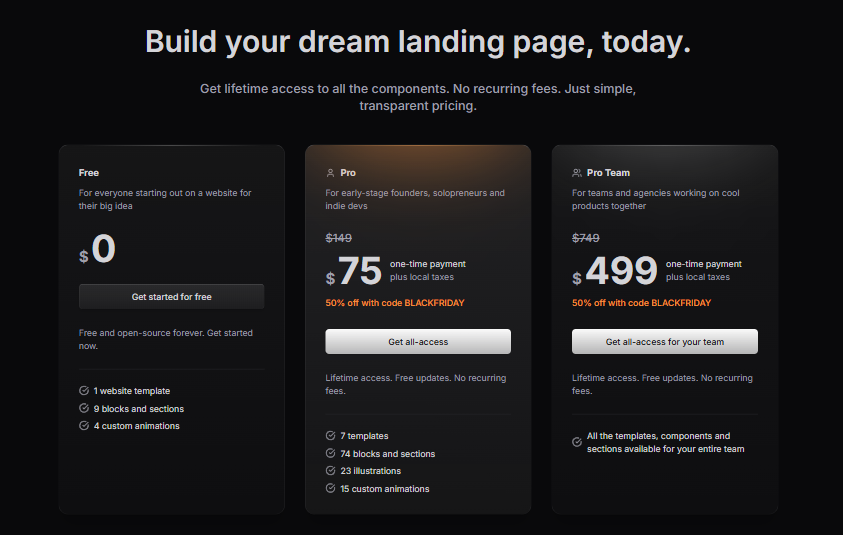
Launch UI Pricing offers polished pricing-section variants for subscription products and landing pages. The examples cover free, starter, enterprise, individual, and team plans with clear feature lists and conversion-focused calls to action.
Monthly and yearly switching, savings messaging, highlighted tiers, billing notes, and discount-oriented presentation make the collection useful when pricing communication is the main design challenge.
Why Choose Launch UI Pricing?
- Strong visual hierarchy
- Several pricing configurations
- Clear savings and billing messages
- Good fit for product landing pages
- Free and Pro options
Key Features
- Monthly and yearly pricing
- Savings labels
- Multi-tier plan cards
- Feature comparison lists
- Individual and team plans
- Responsive layouts
Keep in Mind: Some variants require Launch UI Pro. Pricing sections communicate plans but still need to be connected to your checkout and subscription system.
Shadcn Shopping Cart
- Best For:
- Cart and pre-checkout experiences
- Type:
- Free Blocks
- Framework:
- React, Tailwind CSS, Shadcn UI
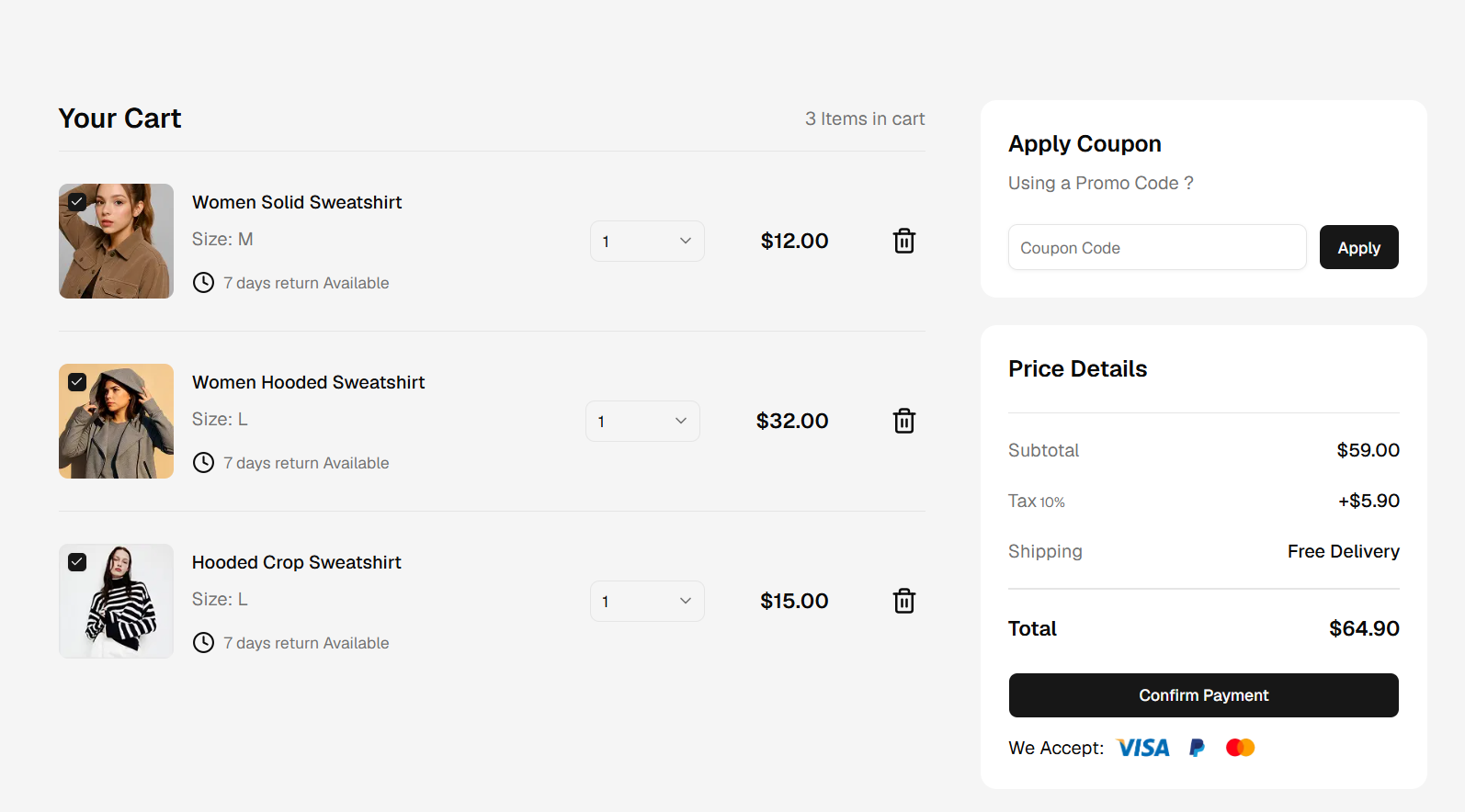
Shadcn Studio Shopping Cart provides three cart patterns that cover a full two-column page, a sheet sidebar, and a compact modal. Together they offer useful building blocks for the step immediately before checkout and payment.
The layouts include product images, quantity controls, removal actions, promo inputs, discount calculations, delivery thresholds, tax and shipping summaries, and checkout buttons. They work for physical products, digital goods, marketplaces, and recurring-product orders.
Why Choose Shadcn Studio Shopping Cart?
- Page, sheet, and modal options
- Detailed cart interactions
- Useful for multiple commerce models
- Responsive Shadcn design
- Figma previews available
Key Features
- Product and quantity controls
- Remove-item actions
- Promo and discount inputs
- Subtotal and shipping summary
- Free-delivery threshold
- Checkout actions
Keep in Mind: These cart blocks need application state, pricing calculations, inventory checks, persistence, and checkout APIs to become a production commerce flow.
How to Choose the Right Shadcn Billing Template
The right resource depends on where the user is in the billing journey and how much application logic already exists.
-
For a SaaS account billing page: Billing SDK is the best starting point because it brings the current plan, renewal, credit usage, balance, and billing actions into one screen.
-
For an admin billing portal: Creative Tim offers focused blocks for billing contacts, cards, transactions, invoices, and add-ons that can be assembled inside a dashboard.
-
For ecommerce checkout: Shadcnblocks provides the broadest checkout selection, with layouts for cart review, addresses, payment methods, and multi-step completion.
-
For payment selection only: Shadcn UI Kit provides compact premium payment-method cards that can be inserted into an existing checkout or account page.
-
For pricing pages: shadcn-pricing-page is the strongest animated option, Pricing Page Shadcn is a simpler theme-aware starter, and Launch UI offers the most polished marketing-oriented variants.
-
For invoices: Invoify is the clear choice because it is a working invoice generator rather than a visual block.
-
For order review and confirmation: Shadcn Studio Order Summary provides itemized, tabbed, and tracking-oriented layouts.
-
For the cart before checkout: Shadcn Studio Shopping Cart covers full-page, sidebar, and modal presentations.
What to Look for in a Billing Template
A good-looking billing page is only one layer of a reliable billing system. Evaluate the UI and the integration requirements together before choosing a starting point.
Billing Scope
- Decide whether you need pricing, checkout, subscription management, usage, invoices, or all of them. A pricing section and a customer billing portal solve very different problems.
Backend Integration
- Check how the template expects to receive plans, subscriptions, invoices, and usage data. Most UI resources in this list need to be connected to a billing provider and your own server-side logic. Teams that want to skip building the payment step can drop in Whop’s express checkout button, which comes in React and non-React versions and shows Apple Pay, Google Pay or a checkout popup depending on the device.
Pricing Model
- Flat-rate subscriptions, seats, metered usage, credits, add-ons, and one-time purchases need different controls and explanations. Choose a layout that makes your actual model easy to understand.
Payment Security
- Avoid handling raw card data in ordinary form fields. Use secure, provider-hosted payment elements or checkout flows and follow the compliance requirements that apply to your business. It also helps to plan for payment fraud prevention early, so stolen cards and fake orders are caught before they turn into chargebacks. A merchant of record can also help manage payment-related responsibilities.
Invoice and Tax Requirements
- Confirm how invoices, receipts, billing addresses, tax IDs, regional taxes, currencies, and refunds will be produced. A visual invoice screen does not provide accounting or tax compliance by itself.
Responsive Design
- Test pricing tables, invoice rows, usage metrics, checkout forms, and order summaries on narrow screens. Financial information must remain readable without hiding important totals or terms.
Accessibility
- Review focus states, form labels, error messages, keyboard behavior, table semantics, and status announcements. Billing actions are high-impact and should be clear for every user.
Licensing and Access
- Some resources are open source, some mix free and premium blocks, and some public repositories do not clearly state a license. Confirm the current terms before using source code in a commercial product.
Frequently Asked Questions
What is a Shadcn billing template?
- A Shadcn billing template is a reusable screen, block, or application built with Shadcn UI components for tasks such as displaying plans, managing subscriptions, collecting payment details, showing usage, generating invoices, or reviewing orders.
What is the best Shadcn billing template?
- Billing SDK is the best overall choice for a SaaS account billing dashboard. Shadcnblocks is better for ecommerce checkout, while Invoify is the most relevant option for invoice generation.
Are these Shadcn billing templates free?
- Several are free or open source, including Billing SDK and Invoify. Shadcnblocks, Creative Tim, and Launch UI combine free and premium resources, while Shadcn UI Kit’s payment-method examples require premium access.
Do Shadcn billing templates process payments?
- Usually not. Most provide front-end components and example interactions. You still need a payment provider, secure server-side endpoints, webhook handling, subscription state, and error recovery.
Can I connect these templates to Stripe?
- Yes. Because the components are editable React code, they can be connected to Stripe Checkout, Elements, the customer portal, or your own API layer. The same principle applies to other billing providers, but the integration work is separate from the UI.
What is the difference between a pricing page and a billing portal?
- A pricing page helps prospects compare plans before purchasing. A billing portal helps existing customers manage subscriptions, payment methods, invoices, usage, cancellations, and renewals.
Can I use these templates for usage-based billing?
- Yes, but choose a layout that can clearly show consumed units, remaining credits, billing periods, limits, and upcoming charges. Billing SDK is the closest match in this collection because it already includes credit usage and balance information.
Final Verdict
The best Shadcn billing resource depends on whether you are selling a subscription, collecting an ecommerce payment, presenting pricing, or managing invoices after a purchase.
For a dedicated SaaS billing dashboard, Billing SDK offers the most complete starting point. Shadcnblocks is the strongest collection for checkout flows, Creative Tim covers admin-oriented billing patterns, and Invoify stands out when invoice generation is the priority. Shadcn Studio’s order-summary and shopping-cart blocks are strong supporting pieces for ecommerce projects.
Whichever resource you choose, treat it as the interface layer of the billing system. Connect it to secure payment infrastructure, validate every server-side action, and test renewals, failures, refunds, taxes, and access changes before shipping.