We’re excited to introduce a major update to our Shadcn Theme Generator based on the latest improvements in the shadcn/ui ecosystem.
This update focuses on making the customization experience more modern, flexible, and aligned with real-world UI workflows while still keeping everything simple and developer-friendly.
Our goal was to make the Theme Generator feel much closer to the new shadcn/ui customization experience while giving developers and designers deeper control over their entire design system.
Whether you’re building a SaaS dashboard, startup landing page, admin panel, or a full-scale web application, these updates help you create a more consistent and scalable UI system faster than before.
More Powerful Customization Options
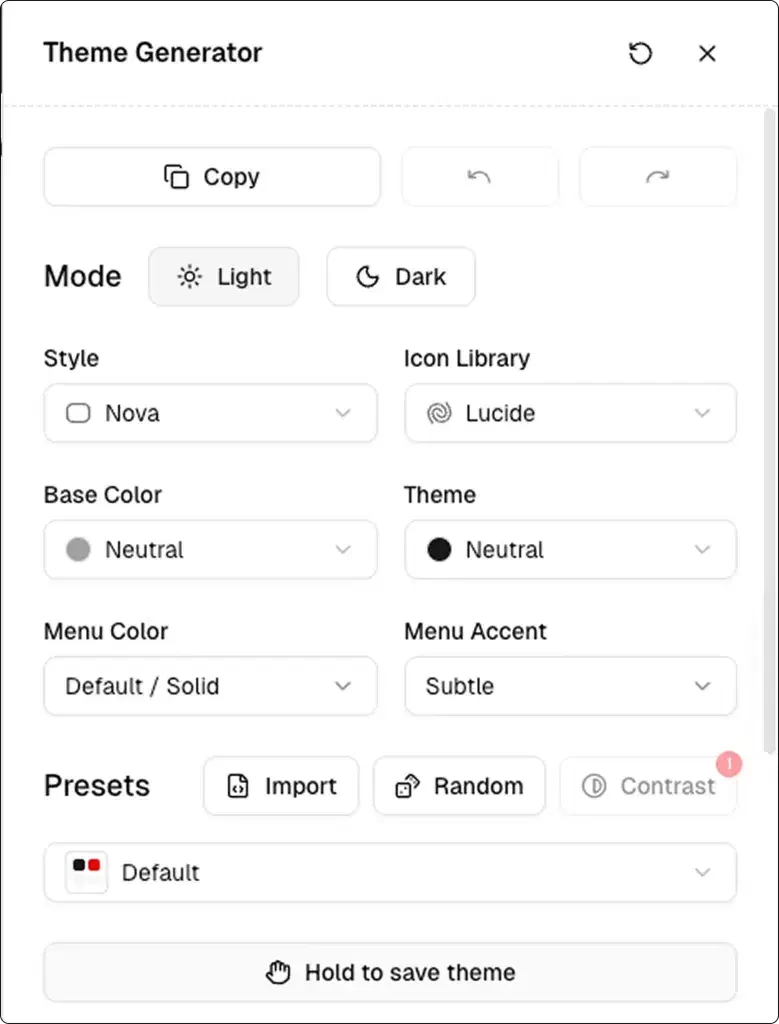
The Theme Generator now gives you direct access to several important design system settings so you can customize your project exactly the way you want.
UI Foundations
Choose between different UI foundations depending on your project requirements:
- Radix
- Base
This gives you more flexibility when building interfaces with different component structures and styling approaches.
New Style Presets
We’ve added multiple new style presets inspired by modern interface systems and visual design trends.
Available styles include:
- Vega
- Nova
- Maia
- Lyra
- Mira
- Luma
Each style comes with its own visual personality, spacing rhythm, component feel, and aesthetic direction, making it easier to quickly prototype or build polished production-ready interfaces.
Expanded Icon Library Support
You can now choose between multiple popular icon libraries directly from the Theme Generator:
- Lucide
- Hugeicons
- Phosphor
- Remix
- Tabler
This allows you to maintain better consistency across your UI while matching the visual style of your project more accurately.
Different icon systems can completely change the feel of an interface, so having this flexibility directly inside the generator makes customization much easier.
More Base Color Options
We also expanded the available base colors to help create cleaner and more personalized themes.
Available base colors include:
- Stone
- Olive
- Zinc
- Neutral
- Mauve
- Taupe
- Mist
Along with base colors, you can also customize:
- Theme Color
- Menu Color
- Menu Accent
These additions make it easier to create a design system that matches your brand identity, product style, and user experience goals.
Edit Existing Projects or Start New Ones
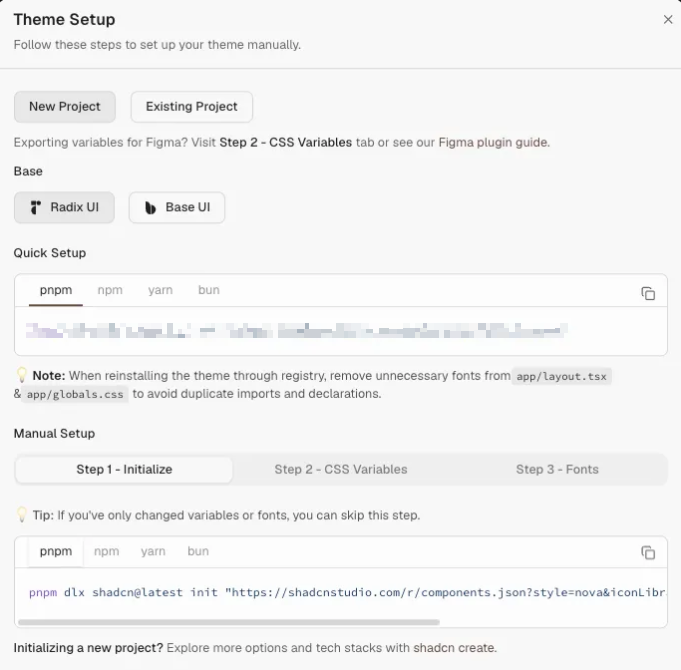
One of the biggest improvements in this update is the ability to either:
- Edit existing projects
- Create completely new projects with predefined settings
Previously, setting up a customized project often required manually updating multiple configurations. With the updated Theme Customizer, you can now select your preferred setup directly from the UI and instantly apply it to your workflow.
You can configure:
- UI foundation
- Style preset
- Icon library
- Base colors
- Theme colors
- Menu customization
- Typography settings
This significantly speeds up the setup process and reduces repetitive configuration work.
Expanded Typography System
Typography plays a huge role in creating polished and professional interfaces, so we’ve expanded the Typography section with many new font options.
Fonts are now organized into three clear categories:
Sans-Serif Fonts Best suited for:
- Headings
- Modern interfaces
- Clean UI layouts
Serif Fonts Ideal for:
- Body content
- Editorial layouts
- More elegant reading experiences
Monospace Fonts Perfect for:
- Code blocks
- Developer-focused interfaces
- Technical dashboards
You can now experiment with different font combinations directly inside the Theme Generator to create stronger visual hierarchy and improve the personality of your UI.
Updated AI & LLM Support
We’ve also upgraded AI support for Pro users based on the latest shadcn/ui architecture and component structure updates.
Along with that, we added improved LLM support to make generating and customizing components much smoother and more accurate.
The updated system helps produce:
- Cleaner component output
- Better layout structures
- More relevant code generation
- Improved compatibility with modern shadcn/ui patterns
Whether you’re using AI to generate components, customize layouts, accelerate prototyping, or speed up development workflows, the overall experience is now faster and much more reliable.
Built for Modern UI Workflows
This update is designed to support modern frontend workflows where speed, scalability, and consistency matter the most.
Instead of manually configuring every part of your design system, the Theme Generator now helps you build and customize your UI foundation much more efficiently.
From style presets and typography improvements to enhanced AI support and project-level customization, everything is focused on helping developers and designers move faster while maintaining high-quality UI systems.
What’s Coming Next? 🚀
With Base UI now fully integrated, we’re turning our attention to the next big milestone: Shadcn Dashboards.
Our focus for the upcoming quarter is building a robust dashboard system that feels native to the Shadcn ecosystem while remaining flexible, scalable, and developer-friendly.
To explore everything we’ve released so far, visit our Changelog.
Want a sneak peek at what’s in progress? Check out our Roadmap to see what we’re actively building.
We’re excited about what’s ahead and can’t wait to share the next wave of updates with the community.
Final Thoughts
The latest Shadcn Theme Generator update makes the overall customization experience more powerful, flexible, and production-ready.
With:
- New styles
- Better typography controls
- Multiple icon libraries
- Expanded color systems
- Improved AI support
- Easier project customization
…you now have significantly more control over how your design system looks and behaves.
We’re excited to continue improving the Theme Generator and making it one of the most flexible customization tools for modern shadcn/ui projects.
Apart from that you can check out some our other Major Updates:
Happy building ✨