This article explains the core concepts behind the Shadcn UI Presets system through beginner-friendly explanations, diagrams, and examples. It focuses on why and how the system works, not on providing copy-paste code.
Share Your Full Design Setup in Just 7 Characters with Shadcn UI Presets
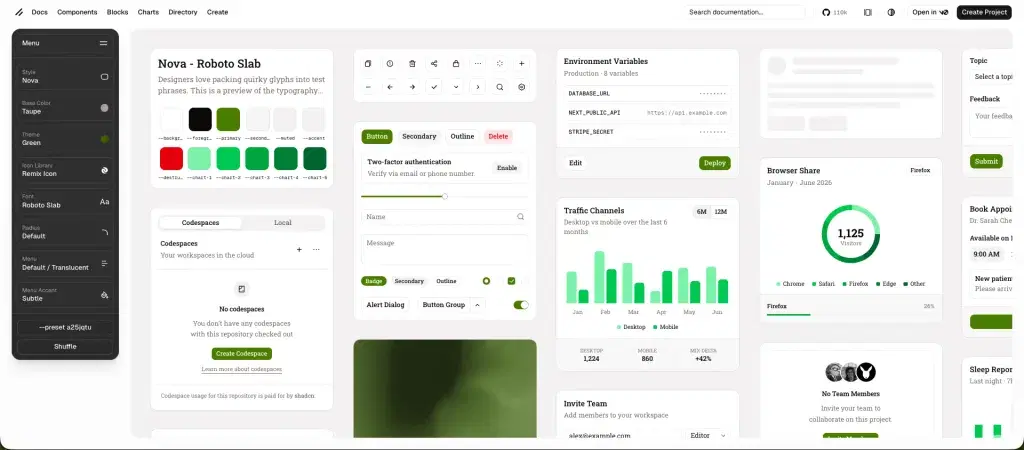
If you’ve used shadcn/ui, you’ve probably noticed something magical about the Shadcn UI preset system. You can configure 8 different design parameters - style, colors, fonts, icons, and more - and the entire configuration gets compressed into a tiny URL like ?preset=aIkeymG.
But how does this actually work? How can you pack so much information into just 7 characters? And why does clicking “Shuffle” instantly randomize your entire design system without reloading the page?
In this article, we’ll dive deep into the engineering behind shadcn/ui’s preset system. Whether you’re a beginner or an experienced developer, you’ll learn:
-
How bit-packing compresses data efficiently
-
Why base62 encoding creates URL-safe codes
-
How randomization with biases creates beautiful designs
-
How the lock system lets you preserve what you love
-
How postMessage enables real-time iframe updates
Let’s start from the basics and work our way up to the advanced concepts.
Want to see the actual code? Check out the shadcn/ui GitHub repository to explore the complete implementation. The key files are in
packages/shadcn/src/preset/andapps/v4/app/(create)/.
The Problem: Shareable Design Systems
Imagine you’ve spent 15 minutes customizing your perfect design system on shadcn/ui’s create page. You’ve selected:
-
Style: Vega (modern and clean)
-
Base Color: Zinc (neutral and professional)
-
Theme: Blue (calming accent)
-
Font: Geist (sharp and readable)
-
Icon Library: Lucide (consistent icons)
-
Radius: Medium (subtle roundness)
-
Menu Accent: Subtle (minimalist)
-
Menu Color: Default (standard contrast)
Now you want to share this configuration with your team. What are your options?
Option 1: The Naive Approach
Send a long URL with query parameters:
<https://ui.shadcn.com/create?style=vega&baseColor=zinc&theme=blue&font=geist&iconLibrary=lucide&radius=medium&menuAccent=subtle&menuColor=default>Problems:
-
Too long (160+ characters)
-
Hard to remember
-
Error-prone when typing
-
Breaks in SMS and chat apps
-
Ugly in links
Option 2: The shadcn/ui Solution
Encode everything into the URL itself:
<https://ui.shadcn.com/create?preset=aIkeymG>Benefits:
-
Compact (just 7 characters!)
-
Works offline (no backend needed)
-
Privacy-first (nothing leaves your browser)
-
Easy to share (fits anywhere)
-
URL-safe (no special characters)
-
Instant (no database queries)
This is the power of client-side encoding. Let’s see how it works.
The Solution: Preset Codes
A preset code is like a compressed ZIP file for your design configuration. Just as ZIP compresses a large file into a smaller one, preset codes compress 8 design parameters into a short string.
Anatomy of a Preset Code
aIkeymG
│└─────┘
│   └── Base62 encoded data
└────── Version prefix (always 'a' for version 1)
Let’s break down what makes this work:
The 8 Parameters Being Encoded
| Parameter | Example Value | Storage Size | Possible Values |
|---|---|---|---|
menuColor | default | 3 bits | 8 options |
menuAccent | subtle | 3 bits | 8 options |
radius | medium | 4 bits | 16 options |
font | geist | 6 bits | 64 options |
iconLibrary | lucide | 6 bits | 64 options |
theme | blue | 6 bits | 64 options |
baseColor | zinc | 6 bits | 64 options |
style | vega | 6 bits | 64 options |
Total: 40 bits (with 13 bits of headroom for future features)
Why 40 Bits?
JavaScript can safely store integers up to 53 bits (technically 2^53 - 1 or 9,007,199,254,740,991). shadcn/ui uses:
-
40 bits for current parameters
-
13 bits saved for future expansion
-
53 bits total (JavaScript’s safe integer limit)
Think of it like a backpack:
-
Max capacity: 53 pounds (JavaScript limit)
-
Currently packed: 40 pounds (current parameters)
-
Space available: 13 pounds (for future features)
This means shadcn can add new parameters later (like animation preferences, spacing themes, etc.) without breaking existing preset codes!
Understanding Bit Packing
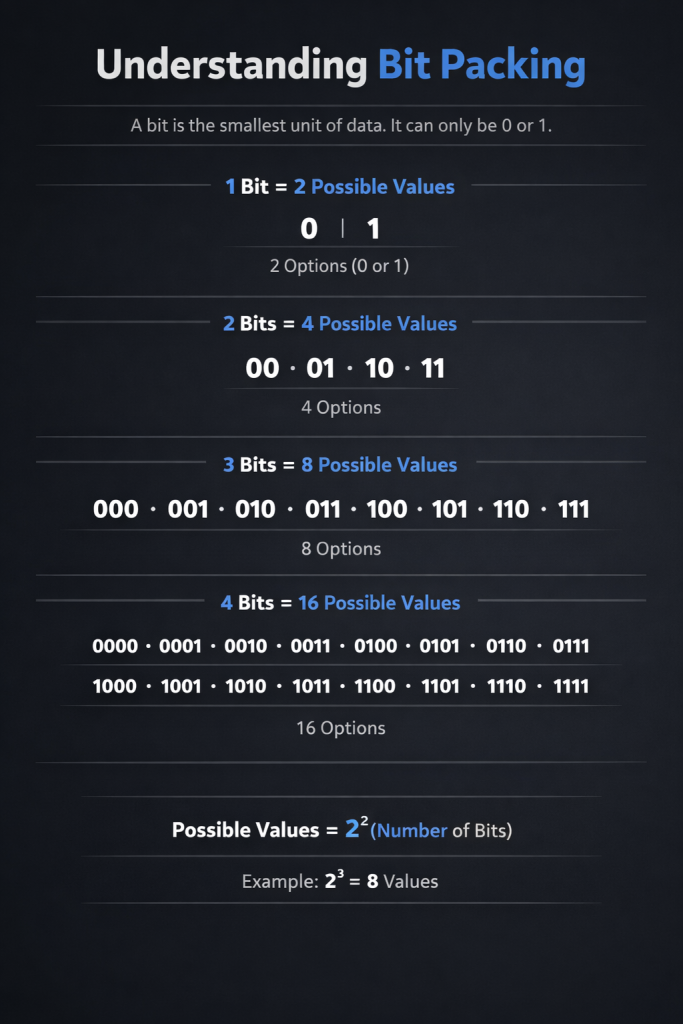
Before we dive into the encoding algorithm, you need to understand bit packing - the technique that makes this compression possible.
What Are Bits?
A bit is the smallest unit of data in computing. It can only be 0 or 1.
1 bit  = 2 possible values (0 or 1)
2 bits = 4 possible values (00, 01, 10, 11)
3 bits = 8 possible values (000, 001, 010, 011, 100, 101, 110, 111)
4 bits = 16 possible values
...
The formula is: possible values = 2^(number of bits)
Why Bits Matter for Presets
shadcn/ui has different numbers of options for each parameter:
// menuColor has 2 options
const menuColors = ["default", "inverted"]
// Needs 1 bit (2^1 = 2), but allocated 3 bits for future options

// radius has 5+ options
const radiusOptions = ["default", "none", "small", "medium", "large", "full"]
// Needs 3 bits (2^3 = 8), allocated 4 bits (2^4 = 16) for future expansion

// font has 20+ options
const fonts = ["inter", "geist", "jetbrains-mono", "lora", /* ... */]
// Needs 5 bits (2^5 = 32), allocated 6 bits (2^6 = 64)
They allocate extra bits to each parameter for future expansion.
A Simple Example: Packing Two Numbers
Let’s say you want to store two pieces of information:
-
Size: small (0), medium (1), large (2), xlarge (3) → needs 2 bits
-
Color: red (0), blue (1), green (2), yellow (3), purple (4) → needs 3 bits
You choose:
-
Size = large (2)
-
Color = green (2)
Method 1: Store Separately (Wasteful)
size = 2  (using 32 bits for an integer)
color = 2 (using 32 bits for another integer)
Total: 64 bits
Method 2: Bit Packing (Efficient)
Combined: 01010
          ││││└─ size bit 0 (0)
          │││└── size bit 1 (1)  → binary 10 = 2
          ││└─── color bit 0 (0)
          │└──── color bit 1 (1)
          └───── color bit 2 (0) → binary 010 = 2
Total: 5 bits (saved 59 bits!)
The Bit Packing Formula
To pack multiple values into one number, the formula is:
packedValue = (value1 × 2^0) + (value2 × 2^bits1) + (value3 × 2^(bits1+bits2)) + ...The 2^offset shifts each value to its designated bit position.
Visual Representation
Think of it like parking cars in a garage:
Garage (40 bits total):
┌─────────┬─────────┬─────────┬─────────┐
│  Car 1  │  Car 2  │  Car 3  │  Car 4  │
│ (3 bits)│ (3 bits)│ (4 bits)│ (6 bits)│
└─────────┴─────────┴─────────┴─────────┘
  Spot 0-2  Spot 3-5  Spot 6-9  Spot 10-15

Each car has a reserved parking spot.
No overlap. No waste. Perfect packing.
Base62 Encoding Explained
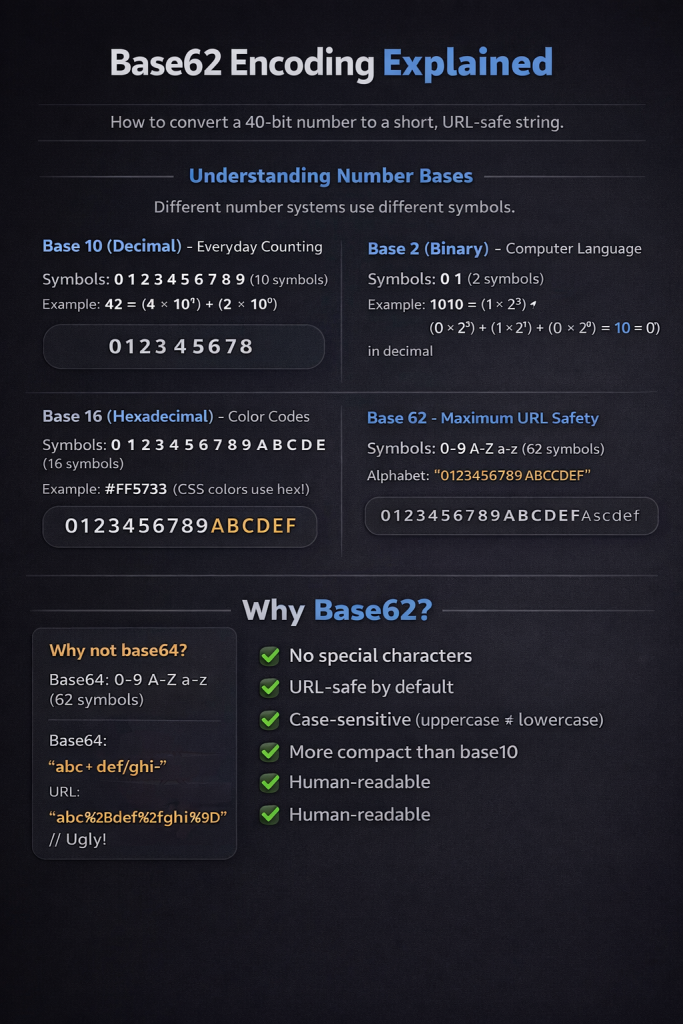
After packing all parameters into a 40-bit number, we need to convert it to a short, URL-safe string. This is where base62 encoding comes in.
Understanding Number Bases
You’re already familiar with different number systems:
Base 10 (Decimal) - Everyday Counting
Symbols: 0 1 2 3 4 5 6 7 8 9 (10 symbols)
Example: 42 = (4 × 10^1) + (2 × 10^0)
Base 2 (Binary) - Computer Language
Symbols: 0 1 (2 symbols)
Example: 1010 = (1×2^3) + (0×2^2) + (1×2^1) + (0×2^0) = 10 in decimal
Base 16 (Hexadecimal) - Color Codes
Symbols: 0 1 2 3 4 5 6 7 8 9 A B C D E F (16 symbols)
Example: #FF5733 (CSS colors use hex!)
Base 62 - Maximum URL Safety
Symbols: 0-9 A-Z a-z (62 symbols)
Alphabet: "0123456789ABCDEFGHIJKLMNOPQRSTUVWXYZabcdefghijklmnopqrstuvwxyz"
Why Base62?
Why not base64? Base64 uses +, /, and = which need URL encoding:
Base64: "abc+def/ghi="
URL:    "abc%2Bdef%2Fghi%3D"  // Ugly!
Base62 is perfect:
-
✅ No special characters
-
✅ URL-safe by default
-
✅ Case-sensitive (uppercase ≠ , lowercase)
-
✅ More compact than base10
-
✅ Human-readable
Base62 Conversion Example
Let’s convert the decimal 1234 to base62:
Step 1: 1234 ÷ 62 = 19 remainder 56
        Alphabet[56] = 'u'

Step 2: 19 ÷ 62 = 0 remainder 19
        Alphabet[19] = 'J'

Result: "Ju" (read bottom to top)
Verification: (19 × 62) + 56 = 1178 + 56 = 1234 ✓
The Algorithm Concept
The base62 conversion algorithm works like this:
To convert to base62:
-
Divide the number by 62
-
Take the remainder and look it up in the alphabet
-
Repeat with the quotient until you reach 0
-
Read the results backwards
To convert FROM base62:
-
For each character, find its position in the alphabet
-
Multiply by 62^position (just like decimal places)
-
Sum all the values
Compression Comparison
Number: 17,737,752,048

Decimal:   17737752048  (11 characters)
Hex:       421E84E10    (9 characters)
Base62:    dFT2cg       (6 characters) ← Most compact!
This is why shadcn/ui uses base62 - maximum compression with URL safety.
The Complete Encoding Flow
Now let’s put it all together and see how shadcn/ui encodes a complete preset.
Step 1: Define the Schema
The system defines a fixed order of fields (which NEVER changes for backward compatibility):
| Field | Bits | Example Values |
|---|---|---|
| menuColor | 3 | default, inverted |
| menuAccent | 3 | subtle, bold |
| radius | 4 | default, none, small, medium, large, full |
| font | 6 | inter, geist, jetbrains-mono, … |
| iconLibrary | 6 | lucide, hugeicons, tabler, … |
| theme | 6 | neutral, zinc, blue, purple, … |
| baseColor | 6 | neutral, zinc, mauve, olive, … |
| style | 6 | nova, vega, maia, lyra, mira |
Important: This order NEVER changes. Changing it would break all existing preset codes!
Step 2: Convert Values to Indices
Each selected value has a position number in its array:
menuColor: "default"    → Index: 0
menuAccent: "subtle"    → Index: 0
radius: "medium"        → Index: 3
font: "geist"           → Index: 10
iconLibrary: "lucide"   → Index: 0
theme: "blue"           → Index: 5
baseColor: "zinc"       → Index: 2
style: "vega"           → Index: 1
Step 3: Pack into 40-Bit Integer
Using the bit-packing formula:
bits = (0 × 2^0)   + // menuColor at offset 0
       (0 × 2^3)   + // menuAccent at offset 3
       (3 × 2^6)   + // radius at offset 6
       (10 × 2^10) + // font at offset 10
       (0 × 2^16)  + // iconLibrary at offset 16
       (5 × 2^22)  + // theme at offset 22
       (2 × 2^28)  + // baseColor at offset 28
       (1 × 2^34)    // style at offset 34

Calculate each term:
= 0 + 0 + 192 + 10240 + 0 + 20971520 + 536870912 + 17179869184
= 17,737,752,048
Step 4: Convert to Base62
toBase62(17,737,752,048) → "dFT2cg"Step 5: Add Version Prefix
"a" + "dFT2cg" = "adFT2cg"Final result: adFT2cg — a 7-character code that represents your entire design system!
Decoding: The Reverse Process
When someone uses a preset code like adFT2cg:
-
Remove version prefix:
"adFT2cg"→"dFT2cg" -
Convert from base62:
"dFT2cg"→17,737,752,048 -
Extract each field using modulo division:
-
menuColor = bits at position 0-2 → index 0 → “default”
-
menuAccent = bits at position 3-5 → index 0 → “subtle”
-
radius = bits at position 6-9 → index 3 → “medium”
-
And so on for all 8 parameters…
-
-
Return the full configuration object
Boom! The complete design system is restored perfectly. 🎉
See the implementation: Check out
packages/shadcn/src/preset/preset.tsin the shadcn/ui repository for the actualencodePreset()anddecodePreset()functions.
Intelligent Randomization with Biases
When you click the “Shuffle” button on shadcn/ui, it doesn’t just select random values. It uses context-aware biases to ensure visually coherent results.
The Problem with Pure Randomization
Imagine if shuffling were completely random:
Style: "lyra" (Minimalist, brutalist)
Font: "lora" (Serif, decorative) ❌ Doesn't match!
Radius: "full" (Fully rounded) ❌ Clashes with lyra!
BaseColor: "gray" (Too boring) ❌
This creates design chaos. Certain combinations just don’t work together.
The Solution: Bias Filters
shadcn/ui applies context-aware filters during randomization:
Example biases:
-
Never use “gray” as a base color (filtered out globally)
-
Lyra style must use monospace fonts (forces “jetbrains-mono”)
-
Lyra style must use no radius (forces “none”)
How Biases Work
A bias filter removes incompatible options based on context:
Example flow:
1. All fonts available: ["inter", "geist", "jetbrains-mono", "lora", "merriweather"]

2. User clicks shuffle → System picks style="lyra"

3. Apply bias filter → Filters to: ["jetbrains-mono"] only!

4. Random selection → Always "jetbrains-mono" for lyra style ✓
Sequential Context Building
The randomization happens in a specific order to build context:
1. Pick STYLE first (influences everything)
   ↓
2. Pick BASE COLOR (filtered by context, affects themes)
   ↓
3. Pick THEME (must be compatible with base color)
   ↓
4. Pick FONT (filtered by style - e.g., lyra → mono)
   ↓
5. Pick RADIUS (filtered by style - e.g., lyra → none)
   ↓
6. Pick ICON LIBRARY (independent choice)
   ↓
7. Pick MENU ACCENT (independent choice)
   ↓
8. Pick MENU COLOR (independent choice)
Real-World Example
Shuffle Result:
  style: "lyra"           ← Picked first
  baseColor: "zinc"       ← Filtered: no "gray"
  theme: "neutral"        ← Compatible with zinc
  font: "jetbrains-mono"  ← Forced by lyra
  radius: "none"          ← Forced by lyra
  iconLibrary: "lucide"   ← Independent
  menuAccent: "subtle"    ← Independent
  menuColor: "default"    ← Independent

Result: Cohesive minimalist design ✓
See the implementation: Check out
apps/v4/app/(create)/lib/randomize-biases.tsfor the complete bias filter configuration.
The Lock System: Preserve What You Love
Sometimes you find the perfect font but want to try different color schemes. The lock system lets you freeze specific parameters while randomizing the rest.
How It Works
The concept is beautifully simple:
1. User shuffles → Gets completely random design
2. User loves the "Geist" font
3. User clicks lock icon next to font selector
4. Font is added to a Set of locked parameters
5. User shuffles again → Everything changes EXCEPT font
6. User keeps shuffling until satisfied
7. User unlocks font when ready to try others
The Implementation Concept
Storage: A simple Set<string> containing locked parameter names

When randomizing:
  IF parameter is in the locked Set:
    → Keep current value
  ELSE:
    → Randomize as normal
Example:
Locks = Set { "font", "radius" }

During shuffle:
  style → Randomize ✓
  baseColor → Randomize ✓
  theme → Randomize ✓
  font → KEEP "geist" (locked) 🔒
  radius → KEEP "medium" (locked) 🔒
  iconLibrary → Randomize ✓
  menuAccent → Randomize ✓
  menuColor → Randomize ✓
User Experience Flow
Shuffle 1: Get random design
  ↓
Found font you love? Lock it 🔒
  ↓
Shuffle 2: Everything changes except font
  ↓
Found radius you love? Lock it 🔒
  ↓
Shuffle 3: Everything changes except font & radius
  ↓
Keep iterating until perfect!
See the implementation: Check out
apps/v4/app/(create)/hooks/use-locks.tsxfor the React Context-based lock system.
Real-Time Updates Without Page Reload
One of the most impressive features is how changes apply instantly without reloading. This is powered by nuqs (Next.js URL Query State) and the postMessage API.
The URL State Management
shadcn/ui uses nuqs to sync React state with URL parameters seamlessly.
How it works:
1. User changes design system → Call setParams()
2. nuqs encodes params to preset code
3. URL updates via history.pushState() → /create?preset=aNewCode
4. React re-renders with new params
5. Browser history updated (back button works!)
6. NO PAGE RELOAD! ✨
Transparent Preset Encoding
The magic happens through automatic encoding/decoding:
On READ (URL → Component):
URL has ?preset=aIkeymG
  ↓
Decode: aIkeymG → { style: "vega", baseColor: "zinc", ... }
  ↓
Component receives full config object
On WRITE (Component → URL):
Component calls: setParams({ style: "vega", baseColor: "zinc", ... })
  ↓
Encode: { ... } → aX7bN2
  ↓
URL updates: /create?preset=aX7bN2
The Iframe Communication Challenge
The preview lives in an iframe (separate window context), which requires special handling.
The problem:
-
Parent window has the URL state
-
Iframe needs to know when the params change
-
IFrames can’t directly access the parent URL
The solution: postMessage API
Parent Window                          Iframe Window
─────────────                         ────────────
URL changes
  ↓
Detect param change
  ↓
Send postMessage ─────────────────────→ Receive message
"design-system-params"                   ↓
                                      Update state
                                         ↓
                                      Apply styles
                                         ↓
                                      Re-render
Why useLayoutEffect?
For instant visual updates without flicker:
❌ useEffect: Runs AFTER browser paint
   → User sees flash of old design
   → Then new design appears
   → Flicker visible!

✅ useLayoutEffect: Runs BEFORE browser paint
   → Styles update synchronously
   → Browser paints once with new design
   → No flicker! Instant!
Keyboard Shortcut Forwarding
The challenge: When you press “R” while focused inside the iframe, the parent window doesn’t see it.
The solution:
Iframe catches "R" key
  ↓
Sends postMessage to parent: { type: "randomize-forward", key: "r" }
  ↓
Parent receives message
  ↓
Parent dispatches keyboard event to itself
  ↓
Normal randomization flow triggers
Result: Press “R” anywhere on the page, even when focused in the preview, and shuffling works! 🎹
See the implementation: Check out:
apps/v4/app/(create)/lib/search-params.ts- URL state with nuqs
apps/v4/app/(create)/hooks/use-iframe-sync.tsx- postMessage communication
apps/v4/app/(create)/components/preview.tsx- Preview with iframe
The Complete Shuffle Flow
Let’s trace exactly what happens when you click “Shuffle”:
Timeline (0-30ms)
0ms    → User clicks "Shuffle" button
1ms    → onClick handler calls randomize()
2ms    → useLocks() checks which params are locked
3ms    → Build RandomizeContext starting with style
4ms    → Apply bias filters to each parameter
5ms    → Random selection from filtered options
6ms    → Build nextParams object
7ms    → Update React ref (optimistic update)
8ms    → Call setParams(nextParams)
10ms   → encodePreset() packs bits and converts to base62
12ms   → nuqs updates URL via history.pushState()
         URL: /create?preset=aNewCode
15ms   → React re-renders parent component
18ms   → useEffect triggers: send message to iframe
20ms   → iframe receives postMessage event
22ms   → iframe setParams() called with new values
25ms   → useLayoutEffect fires (before paint!)
26ms   → Update body.className and CSS variables
27ms   → Browser calculates new styles
28ms   → Browser paints updated design
Total time: ~30 milliseconds (imperceptible to humans!)
Visual Flow Diagram
┌─────────────────┐
│  User Action    │ Click "Shuffle" or press "R"
└────────┬────────┘
         ↓
┌────────────────────┐
│ useRandom().       │ Execute randomization logic
│ randomize()        │
└────────┬───────────┘
         ↓
┌────────────────────┐
│ Check Locks        │ Preserve locked parameters
└────────┬───────────┘
         ↓
┌────────────────────┐
│ Apply Biases       │ Filter incompatible options
└────────┬───────────┘
         ↓
┌────────────────────┐
│ Random Selection   │ Pick from filtered options
└────────┬───────────┘
         ↓
┌────────────────────┐
│ setParams()        │ Update React state
└────────┬───────────┘
         ↓
┌────────────────────┐
│ encodePreset()     │ Pack bits → base62
└────────┬───────────┘
         ↓
┌────────────────────┐
│ URL Update         │ /create?preset=aNewCode
│ (nuqs)             │ (no page reload!)
└────────┬───────────┘
         ↓
┌────────────────────┐
│ React Re-render    │ Parent updates
└────────┬───────────┘
         ↓
┌────────────────────┐
│ postMessage        │ Send to iframe
└────────┬───────────┘
         ↓
┌────────────────────┐
│ Iframe Receives    │ Update preview state
└────────┬───────────┘
         ↓
┌────────────────────┐
│ useLayoutEffect    │ Apply CSS (before paint!)
└────────┬───────────┘
         ↓
┌────────────────────┐
│ Browser Paint      │ Instant visual update ✨
└────────────────────┘
Press “R” anywhere on the page, even in the preview iframe, and shuffling works! 🎹
Going Further
Want to see the actual code and build your own preset system? Here are the resources you need:
shadcn/ui Source Code
Explore the complete implementation on GitHub:
-
Preset encoding/decoding:
packages/shadcn/src/preset/preset.ts -
Randomization logic:
apps/v4/app/(create)/hooks/use-random.tsx -
Bias filters:
apps/v4/app/(create)/lib/randomize-biases.ts -
Lock system:
apps/v4/app/(create)/hooks/use-locks.tsx -
URL state management:
apps/v4/app/(create)/lib/search-params.ts -
Iframe communication:
apps/v4/app/(create)/hooks/use-iframe-sync.tsx
Try It Live
-
Live preset creator: ui.shadcn.com/create - Press “R” to shuffle!
-
Try locking parameters and see how biases work in real-time
Learn More
-
nuqs documentation: nuqs.47ng.com - URL state management library
-
MDN: Bitwise operators: Bitwise AND - Understanding bit manipulation
-
MDN: postMessage API: Window.postMessage() - Cross-window communication
-
Base conversion: Wikipedia: Radix - Understanding number bases
Special Mention: Shadcn Studio
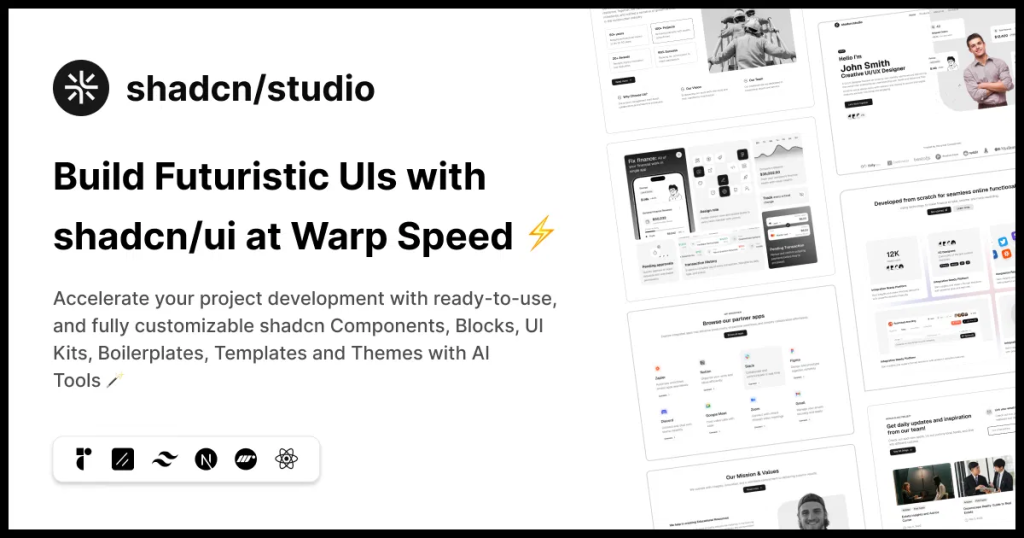
Shadcn Studio goes beyond animations by providing animated blocks and sections built on top of Shadcn UI. It’s perfect for teams that want speed without compromising design quality.
Key Features:
-
Pre-animated components, blocks, and layouts
-
Built specifically for Shadcn UI
-
Consistent motion patterns
-
Great for marketing and landing pages
Furthermore, Animated variants with motion add smooth, modern animations to your components, enhancing user experiences with minimal effort.
Best For: Startups, agencies, and rapid MVP development.
Additionally, it comes with the following features:
-
Open-source: Dive into a growing, community-driven collection of copy-and-paste shadcn UI components, Shadcn blocks, and templates.
-
Component & Blocks variants: Access a diverse collection of customizable shadcn blocks and component variants to quickly build and style your UI with ease.
-
Landing pages & Dashboards: Explore 20+ premium & free Shadcn templates for dashboards, landing pages & more. Fully customizable & easy to use.
-
shadcn/ui for Figma: Speed up your workflow with Shadcn Figma UI kit with components, blocks & templates – a full design library inspired by shadcn/ui.
-
Powerful theme generator: Customize your UI instantly with Shadcn Theme Generator. Preview changes in real time and create consistent, on-brand designs faster.
-
shadcn/studio MCP: Integrate shadcn/studio MCP Server directly into your favorite IDE and craft stunning shadcn/ui Components, Blocks, and Pages inspired by shadcn/studio.
-
Shadcn Figma To Code Plugin: Convert your Figma designs into production-ready code instantly with the Shadcn Figma Plugin.
Conclusion
The shadcn/ui preset system is a masterclass in thoughtful engineering. It solves real UX problems (sharing, performance, privacy) with elegant technical solutions (bit-packing, base62, client-side encoding).
Key principles demonstrated:
-
Simplicity: 7 characters to share entire configurations
-
Performance: No backend, no database queries, instant updates
-
Privacy: All encoding happens in your browser
-
Quality: Biases ensure visually coherent results
-
Future-proof: Version prefixes and headroom bits
-
User-centric: Locks, keyboard shortcuts, no page reloads
Whether you’re building a design system, a configuration tool, or any app that needs shareable state, these patterns will serve you well.
This article explains the core concepts behind shadcn/ui’s preset system through beginner-friendly explanations, diagrams, and examples. It focuses on why and how the system works, not on providing copy-paste code.
For implementation details and production-ready code, visit the shadcn/ui GitHub repository. The codebase is well-documented and demonstrates best practices for:
-
Type-safe preset encoding/decoding
-
React hooks for state management
-
URL synchronization with nuqs
-
Iframe communication patterns
-
Keyboard Event Handling
Happy coding!