
Shadcn/ui gives you beautiful components, but they’re frontend-only, no backend, no data fetching. Here’s how to create a Full-stack Component in Shadcn UI.
We’re building an Instagram profile viewer that pulls live data from your Instagram Business Account using Meta’s official Facebook Graph API. Real profile stats, actual photos, engagement metrics, all with production-ready caching and rate limiting.
Prerequisites
Before you start, make sure you have:
-
Node.js 18+ installed
-
A Facebook account (verified with phone and email)
-
An Instagram Business or Creator account
-
A Facebook Page (we’ll create one if needed)
-
Basic knowledge of Next.js and React
Understanding the Architecture
This isn’t just a component; it’s a complete feature with caching, rate limiting, and proper error handling. Here’s how the pieces fit together:
-
The UI Layer - Shadcn components (Cards, avatars, dialogs, badges) that users see and interact with.
-
The Server Layer - A Next.js API route that fetches data from Meta’s Facebook Graph API v25.0.
-
The Integration Layer - Meta’s Facebook Graph API. Official, authenticated, and reliable access to your Instagram Business Account data.
-
The Performance Layer - Two levels of caching:
-
In-memory Map cache (10 minutes) - Lightning fast, prevents redundant API calls
-
Next.js fetch cache (10 minutes) - Built-in request deduplication
-
The Protection Layer - Rate limiting (20 requests/minute per IP) to prevent abuse and protect your API quota.
-
The UX Layer - Loading skeletons, error messages, pop-up modals, and responsive grids.
⚠️ Important Limitations
You can ONLY access:
-
Your own Instagram Business Account
-
Public profile data
-
Posts you’ve published
You CANNOT access:
-
Other users’ accounts
-
Private accounts (even your own if set to private)
-
Stories or Reels (requires additional permissions)
-
Direct messages (requires additional permissions)
-
Detailed analytics (requires additional permissions)
Unlike web scraping methods, the official API doesn’t allow fetching data from other users’ profiles. This is a fundamental limitation of the Graph API.
For most use cases (portfolio sites, business websites, agency pages), this is perfect—you’re showing your own Instagram feed anyway.
Project Setup for Creating a Full-Stack Component in Shadcn
Let’s get a Next.js project running with Shadcn already configured. Use the Create app feature from Shadcn to make setup simple. While you’re setting things up, it’s also a good time to prepare an app icon or logo; a logo maker can help you generate one quickly if you don’t already have one.
Your project structure should look like this:
shadcn-instagram/
├── app/
│   ├── api/
│   │   ├── instagram/
│   │   │   └── posts/
│   │   │       └── route.ts
│   │   └── proxy-image/
│   │       └── route.ts
│   ├── page.tsx
│   └── layout.tsx
├── components/
│   └── ui/
│       ├── card.tsx
│       ├── avatar.tsx
│       ├── dialog.tsx
│       └── ...
├── lib/
│   └── utils.ts
└── .env.local
The app/page.tsx file will render the Instagram feed. If you want to build out the surrounding screen, Shadcn pages offer complete layouts you can adapt for navigation and related content.
Getting Your Meta API Credentials
Before we can fetch Instagram data, you need to set up a Meta (Facebook) Developer account and get your API credentials. This is required because we’re using the official Facebook Graph API.
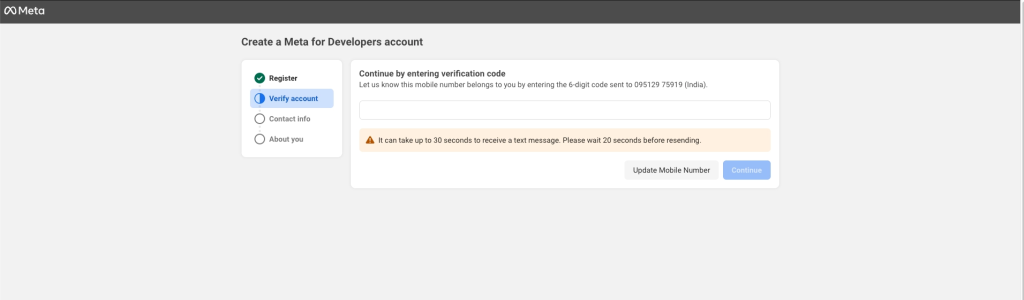
Step 1: 🔐 Create a Meta Developer Account
-
Navigate to Meta for Developers
-
Log in with your Facebook account
-
Important: Verify your account with both:
- Phone number
- Email address
Step 2: 📱 Create a New App
-
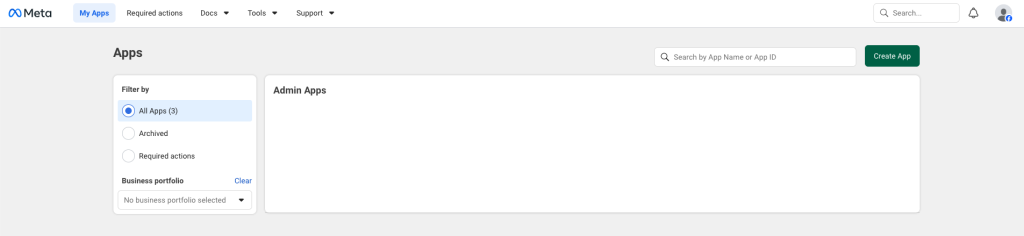
Click “Create App” (or “My Apps” → “Create App”)
-
Fill in the details:
- App Name: Choose any name (e.g., “Instagram Feed Viewer”)
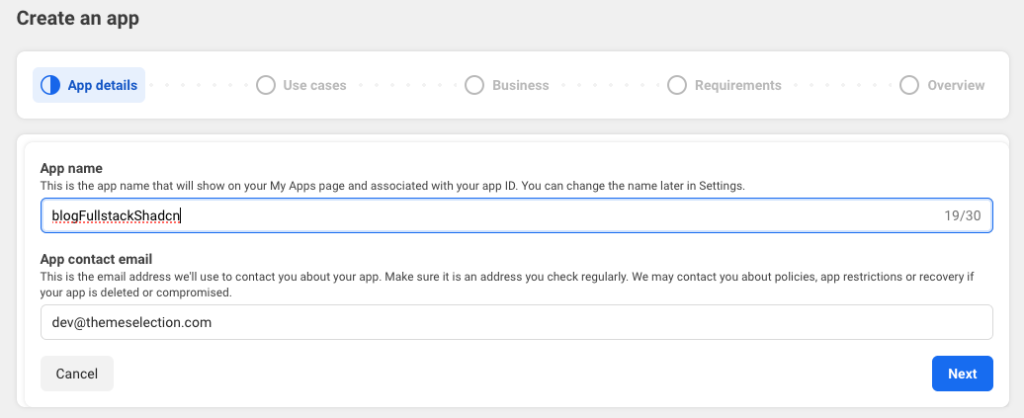
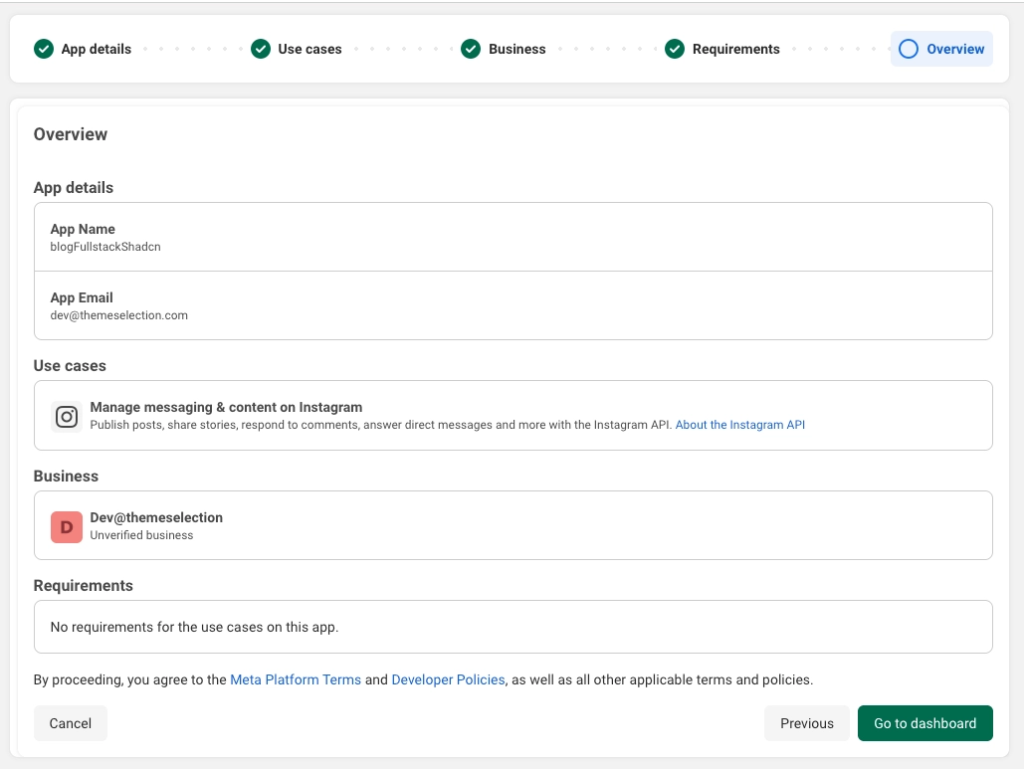
- Use Case: In All, select “Manage messaging & content on Instagram.”

- App Name: Choose any name (e.g., “Instagram Feed Viewer”)
-
Complete the app creation process
Step 3: ✅ Configure Permissions
Before generating your access token, you need to request the right permissions:
-
Navigate to your app dashboard
-
Go to Use Cases → Customize
-
Click on Permissions and Features
-
Add these permissions (you’ll need to request them):
pages_show_list
business_management
instagram_basic
pages_read_engagement
instagram_manage_contents
Step 4: 🔑 Generate Access Token
-
In the top navigation bar, click Tools → Graph API Explorer
-
Add the permissions we granted
-
Click “Generate Access Token”
-
Log in with your Facebook account and authorize
-
Copy and save this token - this is your
FACEBOOK_PAGE_ACCESS_TOKEN
⚠️ Token Expiration:
-
Short-lived tokens: 1 hour (what you just generated)
-
Long-lived tokens: 60 days (recommended for production)
To get a long-lived token:
-
Go to Access Token Debugger
-
Paste your short-lived token
-
Click “Debug”
-
Click “Extend Access Token” at the bottom
-
Copy the new long-lived token
For automated token refresh, see the Meta documentation.
Step 5: 📸 Convert Instagram to Business Account
Your Instagram account must be a Business or Creator account:
-
Open the Instagram app or web
-
Go to Settings → Account
-
Tap Switch to Professional Account
-
Choose Business or Creator
-
Complete the setup process
Step 6: 🔗 Create and Link Facebook Page
Instagram Business Accounts must be linked to a Facebook Page:
-
Go to Facebook and create a new Page
- You can name it anything
- Category doesn’t matter for this use case
- You can leave it mostly blank
-
Once created, go to Page Settings
-
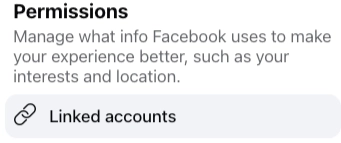
Navigate to Settings → Linked Accounts (or Instagram) on the sidebar
-
Click Connect Account
-
Log in and authorize your Instagram account
Step 7: 🆔 Get Your Instagram Business Account ID
Now we need to find your Instagram Business Account ID:
-
Go back to Graph API Explorer
-
Make sure your app is selected
-
In the search field, enter:
me/accounts?fields=instagram_business_account -
Click “Submit”
You’ll get a response like:
{
  "data": [
    {
      "instagram_business_account": {
        "id": "17841469217838238"
      },
      "id": "96454546313330"
    }
  ]
}
Copy the instagram_business_account.id value—this is your INSTAGRAM_BUSINESS_ACCOUNT_ID.
Step 8: 🔐 Configure Environment Variables
Create a .env.local file in your project root:
FACEBOOK_PAGE_ACCESS_TOKEN=your_access_token_here
INSTAGRAM_BUSINESS_ACCOUNT_ID=your_instagram_account_id_here
⚠️ Never commit your
.env.local file to Git! Add it to .gitignore. Keeping secrets out of source control is an important part of preventing accidental credential exposure, and developers can also review Gitleaks alternatives when evaluating ways to detect leaked secrets.
What Data Can You Access
With these credentials, you can fetch:
Profile Information:
fields: biography,followers_count,follows_count,media_count,name,profile_picture_url,username,websitePosts/Media:
fields: id,caption,media_type,media_url,permalink,thumbnail_url,timestamp,like_count,comments_countWhy Caching Matters
Meta’s Graph API has rate limits. For development mode, you get around 200 calls per hour. For production apps, limits are higher but still finite.
Instagram profiles don’t change that fast. Followers update gradually, and posts go up once or twice a day. A 10-minute cache is perfectly reasonable and keeps you well under API limits.
Two-Layer Caching Strategy
Layer 1: In-Memory Map (10 min TTL)
-
Stores results in Node.js process memory
-
Instant lookups-zero network calls
-
Cleared when the server restarts
Layer 2: Next.js Fetch Cache (10 min TTL)
-
Built into Next.js
fetch() -
Deduplicates parallel requests
-
Persists across serverless invocations
Result: First request hits Meta API. Next 600 seconds? Instant responses.
Without caching, high traffic could exhaust your API quota. With caching, you can handle serious traffic while staying within limits.
Designing the Data Contract
Before we fetch anything, we need to know what we’re fetching. Here’s our TypeScript contract:
interface InstagramPost {
  id: string;
  image: string;
  thumbnail: string;
  caption: string;
  likes: number;
  comments: number;
  url: string;
  timestamp: string;
  type: "image" | "video" | "carousel";
}

interface InstagramProfile {
  username: string;
  full_name: string;
  profile_pic: string;
  followers: number;
  following: number;
  posts_count: number;
  bio: string;
  is_private: boolean;
}
This contract defines exactly what our API returns and what our UI expects. No guessing, no any types, no surprises.
Building the Server Layer: Caching
Create app/api/instagram/posts/route.ts. We’ll build this in sections for clarity.
First, set up the caching system:
// =============================================================================
// CACHING SYSTEM
// =============================================================================

interface CacheEntry<T> {
  data: T;
  timestamp: number;
  expiresAt: number;
}

const cache = new Map<string, CacheEntry<unknown>>();
const CACHE_TTL = 10 * 60 * 1000; // 10 minutes

function getFromCache<T>(key: string): T | null {
  const entry = cache.get(key);
  if (!entry) return null;

  const now = Date.now();
  if (entry.expiresAt < now) {
    cache.delete(key);
    return null;
  }

  return entry.data as T;
}

function saveToCache<T>(key: string, data: T, ttl: number = CACHE_TTL): void {
  const now = Date.now();
  cache.set(key, {
    data,
    timestamp: now,
    expiresAt: now + ttl,
  });

  // Memory management: cleanup old entries
  if (cache.size > 100) {
    for (const [key, value] of cache.entries()) {
      if (value.expiresAt < now) {
        cache.delete(key);
      }
    }
  }
}
Create app/api/instagram/posts/route.ts. We’ll build this in sections for clarity.
First, set up the caching system:
// =============================================================================
// CACHING SYSTEM
// =============================================================================

interface CacheEntry<T> {
  data: T;
  timestamp: number;
  expiresAt: number;
}

const cache = new Map<string, CacheEntry<unknown>>();
const CACHE_TTL = 10 * 60 * 1000; // 10 minutes

function getFromCache<T>(key: string): T | null {
  const entry = cache.get(key);
  if (!entry) return null;

  const now = Date.now();
  if (entry.expiresAt < now) {
    cache.delete(key);
    return null;
  }

  return entry.data as T;
}

function saveToCache<T>(key: string, data: T, ttl: number = CACHE_TTL): void {
  const now = Date.now();
  cache.set(key, {
    data,
    timestamp: now,
    expiresAt: now + ttl,
  });

  // Memory management: cleanup old entries
  if (cache.size > 100) {
    for (const [key, value] of cache.entries()) {
      if (value.expiresAt < now) {
        cache.delete(key);
      }
    }
  }
}
Building the Server Layer: Rate Limiting
Next, add rate limiting to protect your API quota:
// =============================================================================
// RATE LIMITING
// =============================================================================

interface RateLimitEntry {
  count: number;
  resetAt: number;
}

const rateLimits = new Map<string, RateLimitEntry>();
const RATE_LIMIT_WINDOW = 60 * 1000; // 1 minute
const RATE_LIMIT_MAX_REQUESTS = 20; // 20 requests per minute

function checkRateLimit(identifier: string): {
  allowed: boolean;
  retryAfter?: number;
} {
  const now = Date.now();
  const entry = rateLimits.get(identifier);

  if (!entry || entry.resetAt < now) {
    rateLimits.set(identifier, {
      count: 1,
      resetAt: now + RATE_LIMIT_WINDOW,
    });
    return { allowed: true };
  }

  if (entry.count >= RATE_LIMIT_MAX_REQUESTS) {
    const retryAfter = Math.ceil((entry.resetAt - now) / 1000);
    return { allowed: false, retryAfter };
  }

  entry.count++;
  return { allowed: true };
}

// Periodic cleanup to prevent memory leaks
const cleanupInterval = setInterval(() => {
  const now = Date.now();
  for (const [key, value] of rateLimits.entries()) {
    if (value.resetAt < now) {
      rateLimits.delete(key);
    }
  }
}, 60000);

// Clean up on shutdown
if (typeof process !== "undefined") {
  process.on("SIGTERM", () => clearInterval(cleanupInterval));
}
Building the Server Layer: Type Definitions
Define the types for your API responses:
// =============================================================================
// TYPES
// =============================================================================

interface InstagramPost {
  id: string;
  image: string;
  thumbnail: string;
  caption: string;
  likes: number;
  comments: number;
  url: string;
  timestamp: string;
  type: "image" | "video" | "carousel";
}

interface InstagramProfile {
  username: string;
  full_name: string;
  profile_pic: string;
  followers: number;
  following: number;
  posts_count: number;
  bio: string;
  is_private: boolean;
}

// =============================================================================
// INSTAGRAM FETCHER (FACEBOOK GRAPH API)
// =============================================================================

async function fetchInstagramPosts(): Promise<{
  profile: InstagramProfile;
  posts: InstagramPost[];
}> {
  // Check cache first
  const cacheKey = "instagram:profile";
  const cacheEntry = cache.get(cacheKey);
  const cached = getFromCache<{
    profile: InstagramProfile;
    posts: InstagramPost[];
  }>(cacheKey);

  if (cached) {
    const now = Date.now();
    const age = cacheEntry
      ? Math.floor((now - cacheEntry.timestamp) / 1000)
      : 0;
    const expiresIn = cacheEntry
      ? Math.floor((cacheEntry.expiresAt - now) / 1000)
      : 0;

    console.log(`✅ Cache HIT (age: ${age}s, expires in: ${expiresIn}s)`);
    return cached;
  }

  console.log(`🔄 Cache MISS - Fetching from Facebook Graph API`);

  // Get credentials from environment variables
  const pageAccessToken = process.env.FACEBOOK_PAGE_ACCESS_TOKEN;
  const instagramBusinessAccountId = process.env.INSTAGRAM_BUSINESS_ACCOUNT_ID;

  if (!pageAccessToken || !instagramBusinessAccountId) {
    throw new Error(
      "Missing Facebook API credentials. Please set FACEBOOK_PAGE_ACCESS_TOKEN and INSTAGRAM_BUSINESS_ACCOUNT_ID environment variables."
    );
  }

  // Fetch profile info from Graph API v25.0
  const profileUrl = `https://graph.facebook.com/v25.0/${instagramBusinessAccountId}`;
  const profileParams = new URLSearchParams({
    fields:
      "biography,followers_count,follows_count,media_count,name,profile_picture_url,username,website",
    access_token: pageAccessToken,
  });

  const profileResponse = await fetch(`${profileUrl}?${profileParams}`, {
    next: { revalidate: 600 }, // Next.js cache: 10 minutes
  });

  if (!profileResponse.ok) {
    const errorData = await profileResponse.json().catch(() => ({}));
    throw new Error(
      `Facebook Graph API returned ${profileResponse.status}: ${errorData.error?.message || "Unknown error"}`
    );
  }

  const profileData = await profileResponse.json();

  if (profileData.error) {
    throw new Error(`Facebook Graph API error: ${profileData.error.message}`);
  }

  // Fetch posts from Graph API
  const postsUrl = `https://graph.facebook.com/v25.0/${instagramBusinessAccountId}/media`;
  const postsParams = new URLSearchParams({
    fields:
      "id,caption,media_type,media_url,permalink,thumbnail_url,timestamp,like_count,comments_count,children{id,media_type,media_url,thumbnail_url}",
    access_token: pageAccessToken,
    limit: "16",
  });

  const postsResponse = await fetch(`${postsUrl}?${postsParams}`, {
    next: { revalidate: 600 },
  });

  if (!postsResponse.ok) {
    const errorData = await postsResponse.json().catch(() => ({}));
    throw new Error(
      `Facebook Graph API returned ${postsResponse.status}: ${errorData.error?.message || "Unknown error"}`
    );
  }

  const postsData = await postsResponse.json();

  if (postsData.error) {
    throw new Error(`Facebook Graph API error: ${postsData.error.message}`);
  }

  // Parse profile data
  const profile: InstagramProfile = {
    username: profileData.username || "",
    full_name: profileData.name || "",
    profile_pic: profileData.profile_picture_url || "",
    followers: profileData.followers_count || 0,
    following: profileData.follows_count || 0,
    posts_count: profileData.media_count || 0,
    bio: profileData.biography || "",
    is_private: false, // Business accounts are always public
  };

  const posts: InstagramPost[] = (postsData.data || []).map(
    (post: {
      id: string;
      caption?: string;
      media_type: string;
      media_url: string;
      permalink: string;
      thumbnail_url?: string;
      timestamp: string;
      like_count?: number;
      comments_count?: number;
      children?: {
        data: Array<{
          id: string;
          media_type: string;
          media_url: string;
          thumbnail_url?: string;
        }>;
      };
    }) => {
      // Handle carousel albums by extracting all children media
      let carouselMedia:
        | Array<{ url: string; type: "IMAGE" | "VIDEO"; thumbnail?: string }>
        | undefined;

      if (post.media_type === "CAROUSEL_ALBUM" && post.children?.data) {
        carouselMedia = post.children.data.map(child => ({
          url: child.media_url,
          type: child.media_type as "IMAGE" | "VIDEO",
          thumbnail:
            child.media_type === "VIDEO" ? child.thumbnail_url : undefined,
        }));
      }

      return {
        id: post.id,
        image: post.media_type === "VIDEO" ? post.media_url : post.media_url,
        thumbnail:
          post.media_type === "VIDEO"
            ? post.thumbnail_url || post.media_url
            : post.media_url,
        caption: post.caption || "",
        likes: post.like_count || 0,
        comments: post.comments_count || 0,
        url: post.permalink || "",
        timestamp: post.timestamp || new Date().toISOString(),
        type:
          post.media_type === "VIDEO"
            ? "video"
            : post.media_type === "CAROUSEL_ALBUM"
              ? "carousel"
              : "image",
        carouselMedia,
      };
    }
  );

  const result = { profile, posts };

  // Cache the result
  saveToCache(cacheKey, result);
  console.log(`💾 Cached profile for ${Math.floor(CACHE_TTL / 1000)}s`);

  return result;
}
Building the Server Layer: API Route Handler
Finally, wire everything together in the route handler:
import type { NextRequest } from "next/server";
import { NextResponse } from "next/server";

export const runtime = "nodejs";
// ... (all the code from previous sections goes here)

// =============================================================================
// API ROUTE HANDLER
// =============================================================================

export async function GET(request: NextRequest) {
  // Note: This fetches YOUR OWN Instagram Business Account only

  // Rate limiting by IP
  const ip =
    request.headers.get("x-forwarded-for")?.split(",")[0]?.trim() ||
    request.headers.get("x-real-ip") ||
    request.headers.get("cf-connecting-ip") ||
    "unknown";

  const rateLimitResult = checkRateLimit(ip);

  if (!rateLimitResult.allowed) {
    return NextResponse.json(
      {
        success: false,
        error: "Too many requests",
        hint: `Rate limit exceeded. Please try again in ${rateLimitResult.retryAfter} seconds.`,
      },
      {
        status: 429,
        headers: {
          "Retry-After": rateLimitResult.retryAfter?.toString() || "60",
          "X-RateLimit-Limit": RATE_LIMIT_MAX_REQUESTS.toString(),
          "X-RateLimit-Remaining": "0",
          "X-RateLimit-Reset": Math.floor(
            Date.now() / 1000 + (rateLimitResult.retryAfter || 60)
          ).toString(),
        },
      }
    );
  }

  try {
    const { profile, posts } = await fetchInstagramPosts();
    const currentLimit = rateLimits.get(ip);
    const remaining = RATE_LIMIT_MAX_REQUESTS - (currentLimit?.count || 0);

    return NextResponse.json(
      {
        success: true,
        profile,
        posts,
      },
      {
        headers: {
          "Cache-Control": "public, s-maxage=600, stale-while-revalidate=300",
          "X-RateLimit-Limit": RATE_LIMIT_MAX_REQUESTS.toString(),
          "X-RateLimit-Remaining": remaining.toString(),
          "X-RateLimit-Reset": currentLimit
            ? Math.floor(currentLimit.resetAt / 1000).toString()
            : Math.floor((Date.now() + RATE_LIMIT_WINDOW) / 1000).toString(),
        },
      }
    );
  } catch (error) {
    const message =
      error instanceof Error ? error.message : "Failed to fetch Instagram data";
    const isMissingCredentials = message.includes(
      "Missing Facebook API credentials"
    );
    const isApiError = message.includes("Facebook Graph API");

    return NextResponse.json(
      {
        success: false,
        error: message,
        hint: isMissingCredentials
          ? "Please configure FACEBOOK_PAGE_ACCESS_TOKEN and INSTAGRAM_BUSINESS_ACCOUNT_ID in your environment variables."
          : isApiError
            ? "There was an issue with the Facebook Graph API. Please check your access token and account ID."
            : "Make sure your Facebook Page is connected to an Instagram Business Account and your access token is valid.",
      },
      {
        status: isMissingCredentials ? 500 : 500,
        headers: {
          "Cache-Control": "public, s-maxage=300, stale-while-revalidate=600",
        },
      }
    );
  }
}
This code uses official APIs, handles errors gracefully, rate-limits requests, and caches responses—ready for production.
Building the Image Proxy
Instagram images have CORS restrictions that prevent direct loading in browsers. We need a proxy to fetch them server-side.
Create app/api/proxy-image/route.ts:
import { NextRequest, NextResponse } from "next/server";

export const runtime = "nodejs";

// Only proxy images from trusted Instagram CDN hostnames
const ALLOWED_HOSTS = [
  "instagram.famd12-1.fna.fbcdn.net",
  "instagram.fblr1-1.fna.fbcdn.net",
  "scontent.cdninstagram.com",
  "scontent-sin6-3.cdninstagram.com",
  "cdninstagram.com",
];

function isAllowed(url: string): boolean {
  try {
    const { hostname } = new URL(url);
    return ALLOWED_HOSTS.some(
      h =>
        hostname === h ||
        hostname.endsWith("." + h) ||
        hostname.endsWith("fbcdn.net") ||
        hostname.endsWith("cdninstagram.com")
    );
  } catch {
    return false;
  }
}

export async function GET(request: NextRequest) {
  const imageUrl = request.nextUrl.searchParams.get("url");

  if (!imageUrl) {
    return new NextResponse("Missing url parameter", { status: 400 });
  }

  if (!isAllowed(imageUrl)) {
    return new NextResponse("URL not allowed", { status: 403 });
  }

  try {
    const response = await fetch(imageUrl, {
      headers: {
        // Mimic a browser request so Instagram CDN serves the image
        "User-Agent":
          "Mozilla/5.0 (Windows NT 10.0; Win64; x64) AppleWebKit/537.36 (KHTML, like Gecko) Chrome/121.0.0.0 Safari/537.36",
        Accept:
          "image/avif,image/webp,image/apng,image/svg+xml,image/*,*/*;q=0.8",
        "Accept-Encoding": "gzip, deflate, br",
        Referer: "<https://www.instagram.com/>",
      },
      cache: "no-store",
    });

    if (!response.ok) {
      return new NextResponse("Failed to fetch image", {
        status: response.status,
      });
    }

    const contentType = response.headers.get("content-type") || "image/jpeg";
    const buffer = await response.arrayBuffer();

    return new NextResponse(buffer, {
      status: 200,
      headers: {
        "Content-Type": contentType,
        // Cache on CDN/browser for 1 hour — Instagram URLs expire anyway
        "Cache-Control": "public, max-age=3600, stale-while-revalidate=600",
        // Allow cross-origin so the widget JS (any origin) can load images
        "Cross-Origin-Resource-Policy": "cross-origin",
        "Access-Control-Allow-Origin": "*",
      },
    });
  } catch {
    return new NextResponse("Proxy error", { status: 500 });
  }
}
This proxy:
-
Validates domains to prevent open redirect vulnerabilities
-
Fetches images server-side to bypass CORS restrictions
-
Caches aggressively (1 year) since Instagram images don’t change
-
Logs errors for debugging
Building the UI Component
Now for the frontend. This goes in app/page.tsx as a complete page component.
"use client";
import { useEffect, useState } from "react";
import {
Play,
Layers,
Heart,
MessageCircle,
X,
AlertCircle,
Camera,
CheckCircle,
Image as ImageIcon,
ChevronLeft,
ChevronRight,
} from "lucide-react";
import { Card, CardContent } from "@/components/ui/card";
import { Button } from "@/components/ui/button";
import {
Dialog,
DialogContent,
DialogClose,
DialogTitle,
DialogDescription,
} from "@/components/ui/dialog";
import { Avatar, AvatarImage, AvatarFallback } from "@/components/ui/avatar";
function proxyImg(url: string): string {
if (!url) return url;
if (url.startsWith("/api/proxy-image") || url.startsWith("/")) return url;
return "/api/proxy-image?url=" + encodeURIComponent(url);
}
interface InstagramPost {
id: string;
image: string;
thumbnail: string;
caption: string;
likes: number;
comments: number;
url: string;
timestamp: string;
type: "image" | "video" | "carousel";
carouselMedia?: Array<{
url: string;
type: "IMAGE" | "VIDEO";
thumbnail?: string;
}>;
}
interface InstagramProfile {
username: string;
full_name: string;
profile_pic: string;
followers: number;
following: number;
posts_count: number;
bio: string;
is_private: boolean;
}
function formatCount(n: number): string {
if (n >= 1_000_000)
return (n / 1_000_000).toFixed(1).replace(/\.0$/, "") + "M";
if (n >= 1_000) return (n / 1_000).toFixed(1).replace(/\.0$/, "") + "K";
return n.toString();
}
const PostTypeIcon = ({ type }: { type: InstagramPost["type"] }) => {
if (type === "video") {
return <Play className="h-4 w-4" fill="white" />;
}
if (type === "carousel") {
return <Layers className="h-4 w-4" fill="white" />;
}
return null;
};
interface PostModalProps {
post: InstagramPost;
profile: InstagramProfile;
open: boolean;
onClose: () => void;
}
function PostModal({ post, profile, open, onClose }: PostModalProps) {
const [currentMediaIndex, setCurrentMediaIndex] = useState(0);
// Reset carousel index when post changes
useEffect(() => {
setCurrentMediaIndex(0);
// eslint-disable-next-line react-hooks/exhaustive-deps
}, [post.id]);
// Determine media to display
const mediaItems =
post.type === "carousel" && post.carouselMedia
? post.carouselMedia
: [
{
url: post.image,
type:
post.type === "video" ? "VIDEO" : ("IMAGE" as "IMAGE" | "VIDEO"),
thumbnail: post.thumbnail,
},
];
const currentMedia = mediaItems[currentMediaIndex];
const hasMultipleMedia = mediaItems.length > 1;
const goToPrevious = () => {
setCurrentMediaIndex(prev => (prev > 0 ? prev - 1 : mediaItems.length - 1));
};
const goToNext = () => {
setCurrentMediaIndex(prev => (prev < mediaItems.length - 1 ? prev + 1 : 0));
};
return (
<Dialog open={open} onOpenChange={onClose}>
<DialogContent
className="h-full max-h-150! max-w-4xl! gap-0 overflow-hidden p-0"
showCloseButton={false}
>
<DialogTitle className="sr-only">
Post by {profile.username}
</DialogTitle>
<DialogDescription className="sr-only">
Instagram post with {formatCount(post.likes)} likes and{" "}
{formatCount(post.comments)} comments
</DialogDescription>
<div className="flex max-h-[90vh] w-full flex-col overflow-hidden rounded-2xl bg-white md:flex-row">
{/* Media - Image or Video */}
<div className="relative aspect-square shrink-0 bg-black md:aspect-auto md:w-[55%]">
{currentMedia.type === "VIDEO" ? (
<video
src={proxyImg(currentMedia.url)}
className="size-full object-contain"
controls
autoPlay
loop
playsInline
>
<track kind="captions" />
Your browser does not support the video tag.
</video>
) : (
// eslint-disable-next-line @next/next/no-img-element
<img
src={proxyImg(currentMedia.url)}
alt={post.caption}
className="object-fit size-full"
/>
)}
{/* Media type indicator */}
{!hasMultipleMedia &&
(post.type === "video" || post.type === "carousel") && (
<div className="absolute top-3 right-3 rounded-full bg-black/50 p-1.5">
<PostTypeIcon type={post.type} />
</div>
)}
{/* Carousel navigation */}
{hasMultipleMedia && (
<>
{/* Previous button */}
<Button
onClick={goToPrevious}
variant="ghost"
size="icon"
className="absolute top-1/2 left-2 z-10 h-8 w-8 -translate-y-1/2 rounded-full bg-white/90 shadow-lg hover:bg-white"
>
<ChevronLeft className="h-5 w-5 text-gray-700" />
</Button>
{/* Next button */}
<Button
onClick={goToNext}
variant="ghost"
size="icon"
className="absolute top-1/2 right-2 z-10 h-8 w-8 -translate-y-1/2 rounded-full bg-white/90 shadow-lg hover:bg-white"
>
<ChevronRight className="h-5 w-5 text-gray-700" />
</Button>
{/* Carousel indicator dots */}
<div className="absolute bottom-3 left-1/2 flex -translate-x-1/2 gap-1.5">
{mediaItems.map((_, index) => (
<button
key={`${post.id}-media-${index}`}
type="button"
onClick={() => setCurrentMediaIndex(index)}
className={`h-1.5 w-1.5 rounded-full transition-all ${
index === currentMediaIndex
? "h-2 w-2 bg-white"
: "bg-white/50"
}`}
aria-label={`Go to media ${index + 1}`}
/>
))}
</div>
{/* Counter */}
<div className="absolute top-3 right-3 rounded-full bg-black/50 px-3 py-1 text-sm font-medium text-white">
{currentMediaIndex + 1} / {mediaItems.length}
</div>
</>
)}
</div>
{/* Details */}
<div className="flex flex-1 flex-col overflow-hidden">
{/* Header */}
<div className="flex items-center gap-3 border-b p-4">
<Avatar className="h-9 w-9 ring-2 ring-pink-400 ring-offset-1">
<AvatarImage
src={proxyImg(profile.profile_pic)}
alt={profile.username}
/>
<AvatarFallback>
{profile.username.slice(0, 2).toUpperCase()}
</AvatarFallback>
</Avatar>
<div className="min-w-0 flex-1">
<p className="truncate text-sm font-semibold">
{profile.username}
</p>
</div>
<a
href={post.url}
target="_blank"
rel="noopener noreferrer"
className="text-primary shrink-0 text-xs hover:underline"
>
View on Instagram ↗
</a>
</div>
{/* Caption */}
<div className="flex-1 overflow-y-auto p-4">
{post.caption && (
<p className="text-sm leading-relaxed whitespace-pre-line text-foreground">
{post.caption}
</p>
)}
</div>
{/* Stats */}
<div className="space-y-1 border-t p-4">
<div className="flex items-center gap-3">
<Button variant="outline" size="icon">
<Heart className="h-6 w-6" />
</Button>
<Button variant="outline" size="icon">
<MessageCircle className="h-6 w-6" />
</Button>
</div>
<p className="text-sm font-semibold">
{formatCount(post.likes)} likes
</p>
<p className="text-xs text-muted-foreground">
{formatCount(post.comments)} comments
</p>
</div>
</div>
{/* Close button */}
<DialogClose asChild>
<Button
variant="ghost"
size="icon"
className="absolute top-4 right-4 z-10 rounded-full bg-black/50 text-white hover:bg-black/70"
>
<X className="h-4 w-4" />
</Button>
</DialogClose>
</div>
</DialogContent>
</Dialog>
);
}
export default function InstagramProfilePage() {
const [profile, setProfile] = useState<InstagramProfile | null>(null);
const [posts, setPosts] = useState<InstagramPost[]>([]);
const [loading, setLoading] = useState(true);
const [error, setError] = useState<string | null>(null);
const [selectedPost, setSelectedPost] = useState<InstagramPost | null>(null);
const [currentPage, setCurrentPage] = useState(0);
const POSTS_PER_PAGE = 4; // 2x2 grid
const totalPages = Math.ceil(posts.length / POSTS_PER_PAGE);
const currentPosts = posts.slice(
currentPage * POSTS_PER_PAGE,
(currentPage + 1) * POSTS_PER_PAGE
);
const handlePrevious = () => {
setCurrentPage(prev => (prev > 0 ? prev - 1 : totalPages - 1));
};
const handleNext = () => {
setCurrentPage(prev => (prev < totalPages - 1 ? prev + 1 : 0));
};
useEffect(() => {
const fetchData = async () => {
setLoading(true);
setError(null);
try {
// Fetch from your configured Instagram Business Account
const res = await fetch("/api/instagram/posts");
const data = await res.json();
if (!data.success) {
throw new Error(data.error || "Failed to fetch data");
}
setProfile(data.profile);
setPosts(data.posts); // Show all posts for carousel
} catch (err) {
setError(err instanceof Error ? err.message : "Something went wrong");
} finally {
setLoading(false);
}
};
fetchData();
}, []);
return (
<div className="flex min-h-screen items-center justify-center bg-white p-4">
<div className="w-full max-w-md">
{/* Error */}
{error && (
<Card className="mb-6 border-red-200 bg-red-50">
<CardContent className="pt-6">
<div className="flex items-start gap-3 text-red-700">
<AlertCircle className="mt-0.5 h-5 w-5 shrink-0" />
<div>
<p className="font-semibold">Failed to load</p>
<p className="mt-0.5 text-sm opacity-80">{error}</p>
</div>
</div>
</CardContent>
</Card>
)}
{/* Loading Skeleton */}
{loading && (
<Card className="overflow-hidden shadow-lg">
<CardContent className="animate-pulse p-0">
{/* Profile skeleton */}
<div className="flex flex-col items-center px-6 pt-8 pb-6">
<div className="mb-4 h-24 w-24 rounded-full bg-gray-200" />
<div className="mb-2 h-6 w-40 rounded bg-gray-200" />
<div className="mb-4 h-4 w-32 rounded bg-gray-200" />
<div className="mb-5 flex justify-center gap-8 py-2">
<div className="space-y-1">
<div className="h-4 w-12 rounded bg-gray-200" />
<div className="h-3 w-12 rounded bg-gray-200" />
</div>
<div className="space-y-1">
<div className="h-4 w-16 rounded bg-gray-200" />
<div className="h-3 w-16 rounded bg-gray-200" />
</div>
<div className="space-y-1">
<div className="h-4 w-16 rounded bg-gray-200" />
<div className="h-3 w-16 rounded bg-gray-200" />
</div>
</div>
<div className="h-9 w-32 rounded-lg bg-gray-200" />
</div>
{/* Grid skeleton */}
<div className="grid grid-cols-2 gap-0">
<div className="aspect-square border border-gray-100 bg-gray-200" />
<div className="aspect-square border border-gray-100 bg-gray-300" />
<div className="aspect-square border border-gray-100 bg-gray-300" />
<div className="aspect-square border border-gray-100 bg-gray-200" />
</div>
</CardContent>
</Card>
)}
{/* Profile Header */}
{profile && !loading && (
<Card className="boder-0 overflow-hidden p-0 shadow-none">
<CardContent className="p-0">
{/* Profile Info Section */}
<div className="flex flex-col items-center bg-white px-6 pt-8 pb-6">
{/* Profile Picture with gradient ring */}
<div className="relative mb-2">
<div className="h-24 w-24 rounded-full bg-linear-to-tr from-yellow-400 via-pink-500 to-purple-600 p-0.5">
<div className="h-full w-full overflow-hidden rounded-full bg-white p-0.5">
<Avatar className="h-full w-full">
<AvatarImage
src={proxyImg(profile.profile_pic)}
alt={profile.username}
/>
<AvatarFallback className="text-2xl">
{profile.username.slice(0, 2).toUpperCase()}
</AvatarFallback>
</Avatar>
</div>
</div>
</div>
{/* Profile Name & Username */}
<div className="mb-2 text-center">
<div className="mb-1 flex items-center justify-center gap-2">
<h1 className="text-xl font-bold text-gray-900">
{profile.full_name || profile.username}
</h1>
<CheckCircle className="h-5 w-5 fill-current text-blue-500" />
</div>
<p className="text-sm text-gray-600">@{profile.username}</p>
</div>
{/* Stats Row */}
<div className="mb-3 flex items-center justify-center gap-8 py-2">
<div className="text-center">
<div className="text-base font-bold text-gray-900">
{formatCount(profile.posts_count)}
</div>
<div className="text-xs text-gray-600">Posts</div>
</div>
<div className="text-center">
<div className="text-base font-bold text-gray-900">
{formatCount(profile.followers)}
</div>
<div className="text-xs text-gray-600">Followers</div>
</div>
<div className="text-center">
<div className="text-base font-bold text-gray-900">
{formatCount(profile.following)}
</div>
<div className="text-xs text-gray-600">Following</div>
</div>
</div>
{/* Follow Button */}
<Button
asChild
className="h-9 rounded-lg bg-[#0095f6] px-8 text-sm font-semibold text-white shadow-sm hover:bg-[#1877f2]"
>
<a
href={`https://www.instagram.com/${profile.username}/`}
target="_blank"
rel="noopener noreferrer"
>
<Camera className="mr-2 h-4 w-4" />
Follow
</a>
</Button>
</div>
{/* Posts Carousel Section */}
{posts.length > 0 && (
<div className="relative bg-white">
{/* Posts Grid - 2x2 */}
<div className="grid grid-cols-2 gap-0">
{currentPosts.map(post => (
<Button
key={post.id}
variant="ghost"
onClick={() => setSelectedPost(post)}
className="group relative aspect-square h-auto cursor-pointer overflow-hidden rounded-none border border-gray-100 p-0 hover:bg-transparent"
>
{/* eslint-disable-next-line @next/next/no-img-element */}
<img
src={proxyImg(post.thumbnail || post.image)}
alt={post.caption}
className="h-full w-full object-cover"
/>
{/* Overlay for video/carousel indicators */}
{(post.type === "video" ||
post.type === "carousel") && (
<div className="absolute top-2 right-2 rounded-full bg-black/60 p-1">
<PostTypeIcon type={post.type} />
</div>
)}
{/* Hover overlay */}
<div className="absolute inset-0 bg-black/20 opacity-0 transition-opacity group-hover:opacity-100" />
</Button>
))}
</div>
{/* Navigation Arrows */}
{totalPages > 1 && (
<>
{/* Left Arrow */}
<Button
onClick={handlePrevious}
variant="ghost"
size="icon"
className="absolute top-1/2 left-2 z-10 h-10 w-10 -translate-y-1/2 cursor-pointer rounded-full bg-white/90 shadow-lg hover:bg-white"
>
<ChevronLeft className="h-6 w-6 text-gray-700" />
</Button>
{/* Right Arrow */}
<Button
onClick={handleNext}
variant="ghost"
size="icon"
className="absolute top-1/2 right-2 z-10 h-10 w-10 -translate-y-1/2 cursor-pointer rounded-full bg-white/90 shadow-lg hover:bg-white"
>
<ChevronRight className="h-6 w-6 text-gray-700" />
</Button>
</>
)}
</div>
)}
{/* No Posts */}
{posts.length === 0 && !profile.is_private && (
<div className="p-12 text-center text-gray-500">
<ImageIcon className="mx-auto mb-3 h-12 w-12 opacity-30" />
<p className="text-sm font-medium">No posts yet</p>
</div>
)}
</CardContent>
</Card>
)}
</div>
{/* Post Modal */}
{selectedPost && profile && (
<PostModal
post={selectedPost}
profile={profile}
open={!!selectedPost}
onClose={() => setSelectedPost(null)}
/>
)}
</div>
);
}This component showcases production-ready patterns:
-
State Management - Separate states for profile, posts, loading, errors, and selected post.
-
Loading Skeletons - Animated placeholders that match the final layout.
-
Error Handling - User-friendly error messages with clear context.
-
Post Modal - Full-screen dialog with post details, accessible and responsive.
-
Image Proxy - Routes images through our API to avoid CORS issues.
-
Responsive Grid - 3-column grid that adapts to mobile screens.
-
Hover Effects - Instagram-style overlay showing likes/comments on hover.
-
Type Safety - Full TypeScript coverage with no
anytypes.
Testing It Out
Run your dev server:
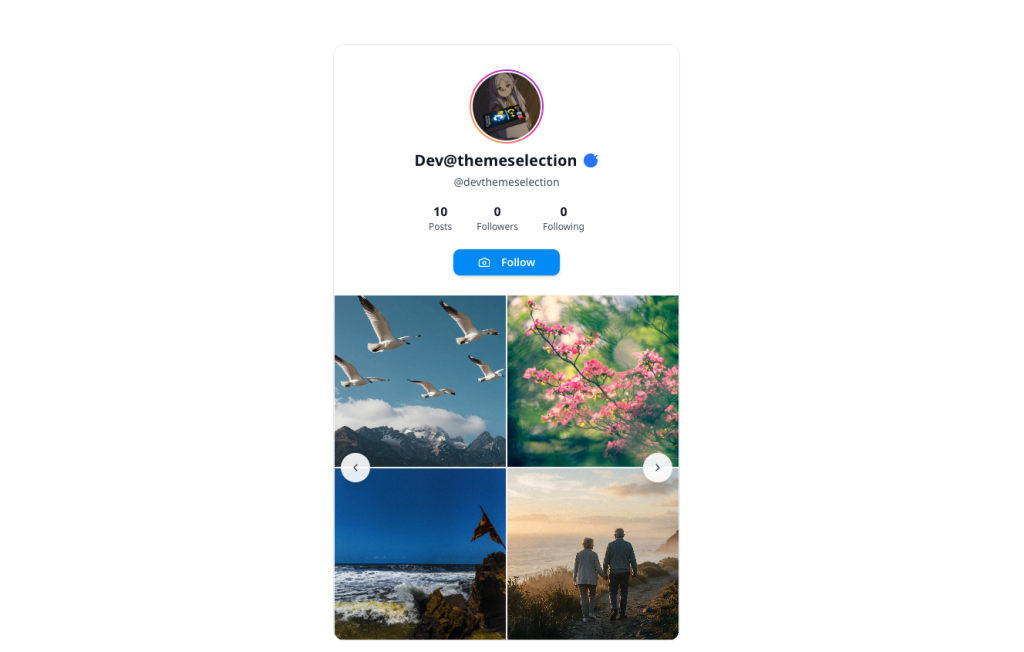
npm run devOpen: http://localhost:3000 and you should see your Instagram profile with posts.
Troubleshooting Guide
”Missing Facebook API credentials.”
-
Check that
.env.localexists in your project root -
Verify both
FACEBOOK_PAGE_ACCESS_TOKENandINSTAGRAM_BUSINESS_ACCOUNT_IDare set -
Restart your dev server after adding environment variables
”Invalid OAuth access token”
-
Your token expired (short-lived tokens last 1 hour)
-
Generate a new token in Graph API Explorer
-
Or extend to a long-lived token (60 days) in Access Token Debugger
”Unsupported get request” or “Invalid user ID”
-
Wrong
INSTAGRAM_BUSINESS_ACCOUNT_ID -
Verify with query:
me/accounts?fields=instagram_business_accountin Graph API Explorer -
Make sure your Instagram account is linked to your Facebook Page
No posts showing
-
Verify your Instagram Business Account has posts
-
Test the
/mediaendpoint in Graph API Explorer -
Check that you’ve granted all required permissions
CORS errors on images
-
Make sure you’re using the
proxyImg()function for all Instagram images -
Check that the proxy route is working:
/api/proxy-image?url=... -
Verify allowed domains in the proxy route match Instagram’s CDN
Rate limit errors
-
You’re making too many API calls
-
Increase
CACHE_TTLfrom 10 minutes to 15-20 minutes -
Check console logs for cache hits vs misses
Cache not working
-
Look for console logs showing “Cache HIT” or “Cache MISS.”
-
Verify the cache key is consistent
-
Remember: cache clears when the dev server restarts
Production Considerations
Access Token Management
Short-lived tokens expire in 1 hour. For production:
-
Generate long-lived tokens (60 days) in Access Token Debugger
-
Implement token refresh logic to automatically exchange expiring tokens
-
Store tokens securely using environment variables or secret management
-
Monitor token expiration and alert before expiry
Example token refresh endpoint:
const response = await fetch(
  `https://graph.facebook.com/v25.0/oauth/access_token?` +
    `grant_type=fb_exchange_token&` +
    `client_id=${process.env.FACEBOOK_APP_ID}&` +
    `client_secret=${process.env.FACEBOOK_APP_SECRET}&` +
    `fb_exchange_token=${oldToken}`
);
Rate Limiting
Meta’s API has rate limits based on your app’s tier:
-
Development mode: ~200 calls/hour
-
Live mode: Varies by app usage and tier
The two-layer cache significantly reduces API calls. Monitor your usage in the Meta Developer Dashboard.
Caching Strategy
For high-traffic sites, consider:
Redis or Memcached for distributed caching across serverless instances:
Image Optimization
Use Next.js Image component for automatic optimization:
import Image from "next/image";

<Image
  src={proxyImg(post.thumbnail)}
  alt={post.caption || "Instagram post"}
  fill
  className="object-cover"
  sizes="(max-width: 768px) 33vw, 25vw"
/>;
Environment Variables
Make sure to set them in your deployment platform:
Vercel:
FACEBOOK_PAGE_ACCESS_TOKENINSTAGRAM_BUSINESS_ACCOUNT_IDNetlify:
FACEBOOK_PAGE_ACCESS_TOKEN "your_token"
INSTAGRAM_BUSINESS_ACCOUNT_ID "your_id"
Security Checklist
-
Never commit
.env.localto version control -
Use long-lived tokens for production (60 days)
-
Implement token refresh before expiration
-
Whitelist only Instagram CDN domains in image proxy
-
Enable rate limiting on API routes
-
Add error logging and monitoring
-
Use HTTPS in production
-
Validate all user inputs
Wrapping Up
You just built a production-ready Instagram profile viewer with:
-
Official Meta Facebook Graph API integration
-
Secure authentication with access tokens
-
Two-layer caching system (in-memory + Next.js)
-
IP-based rate limiting
-
Loading states and error handling
-
Responsive design with modals
-
Type-safe TypeScript throughout
-
Secure image proxy with domain whitelisting
This architecture works for any authenticated API. The pattern is always the same:
-
Set up API credentials securely
-
Server route handles external API calls with authentication
-
Caching protects rate limits and improves performance
-
Rate limiting protects your server and API quota
-
Client component handles UI and state
-
Error handling makes failures graceful
In case you don’t want to create the component from scratch, you can consider using ready-to-use components. For example, Shadcn Studio.
Special Mention: Shadcn Studio
Shadcn Studio goes beyond animations by providing animated blocks and sections built on top of Shadcn UI. It’s perfect for teams that want speed without compromising design quality.
Key Features:
-
Pre-animated components, blocks, and layouts
-
Built specifically for Shadcn UI
-
Consistent motion patterns
-
Great for marketing and landing pages
Furthermore, Animated variants with motion add smooth, modern animations to your components, enhancing user experiences with minimal effort.
Best For: Startups, agencies, and rapid MVP development.
Additionally, it comes with the following features:
-
Open-source: Dive into a growing, community-driven collection of copy-and-paste shadcn components, Shadcn blocks, and templates.
-
Component & Blocks variants: Access a diverse collection of customizable shadcn ui blocks and component variants to quickly build and style your UI with ease.
-
Landing pages & Dashboards: Explore 20+ premium & free Shadcn templates for dashboards, landing pages & more. Fully customizable & easy to use.
-
shadcn/ui for Figma: Speed up your workflow with Shadcn Figma UI Kit with components, blocks & templates – a full design library inspired by shadcn/ui.
-
Powerful theme generator: Customize your UI instantly with Shadcn Theme Generator. Preview changes in real time and create consistent, on-brand designs faster.
-
shadcn/studio MCP: Integrate shadcn/studio MCP Server directly into your favorite IDE and craft stunning shadcn/ui Components, Blocks, and Pages inspired by shadcn/studio.
-
Shadcn Figma To Code Plugin: Convert your Figma designs into production-ready code instantly with the Shadcn Figma Plugin.
Resources & Documentation
GitHub: shadcn-instagram
Next.js
-
Next.js Documentation - Official Next.js docs
-
Route Handlers - Building API routes
-
Caching in Next.js - Understanding caching strategies
-
Environment Variables - Managing secrets securely
Meta Graph API
-
Graph API Reference - Complete API documentation
-
Instagram Graph API - Instagram-specific endpoints and guides
-
Access Tokens Guide - Token types and management
-
Graph API Explorer - Test API calls in your browser
-
Access Token Debugger - Inspect and extend tokens
Shadcn/ui
-
Shadcn/ui Documentation - Component library documentation
-
Components - Browse all available components
-
Examples - Pre-built application templates
-
Themes - Customization and theming guide