Rich text editors play a crucial role in modern web applications, from CMS platforms and dashboards to AI tools and documentation systems. Among the many available options, the Shadcn Tiptap Editor has become a popular choice for developers who want a clean UI, full customization, and modern editing capabilities.
Built using Tiptap’s powerful headless editor and styled with Shadcn UI components, it offers complete control over both functionality and design. In this article, we will explore the awesome Shadcn Tiptap Editor in depth.
Table of Contents
What is Tiptap Editor?
Tiptap Editor is an open-source, headless rich text editor framework built on top of ProseMirror, designed for building modern, customizable content editors. You can pick and choose only the features you need, integrate with any frontend framework (React, Vue, Svelte, etc.), and style the UI however you like.
Unlike out-of-the-box editors (like Quill or Draft.js), Tiptap:
- Is headless; no built-in UI, so you build the toolbar and interface that suits your app.
- Uses a powerful extension system for formatting, tables, images, embeds, and more.
- Supports frameworks like React, Vue, and Svelte with TypeScript support.
As products move toward more flexible and scalable content systems, developers increasingly prefer editors that adapt to their workflows instead of limiting them. This is where Tiptap stands out – providing a robust editing engine that can be combined seamlessly with design systems like Shadcn UI to create fast, beautiful, and production-ready editors.
Benefits of Tiptap Editors
- Highly Customizable: Choose only the extensions and UI features you need, without unnecessary extras.
- Framework-Agnostic: Works seamlessly with React, Vue, Svelte, or plain JavaScript.
- Headless Architecture: No enforced UI, giving you full control over toolbars, menus, and interactions using libraries like Shadcn UI.
- Extensible with Plugins & Extensions: Supports tables, images, lists, code blocks, markdown shortcuts, and more.
- Performance & Modern API: Tiptap 3+ delivers improved rendering performance, SSR compatibility, and strong TypeScript support.
- Flexible Output: Export content as HTML, Markdown, or JSON based on your backend requirements.
Best Shadcn Tiptap Editors:
Shadcn UI has become one of the most popular UI systems in the React ecosystem due to its clean design, Tailwind-based styling, and copy-paste approach.
When combined with Tiptap:
- Tiptap handles editing logic
- Shadcn UI handles layout, buttons, dialogs, and menus
Together, they enable you to build beautiful, production-ready rich text editors that feel modern, fast, and consistent with your app design.
Below are some great examples of Shadcn Tiptap Editors:
Minimal Shadcn Tiptap Editor
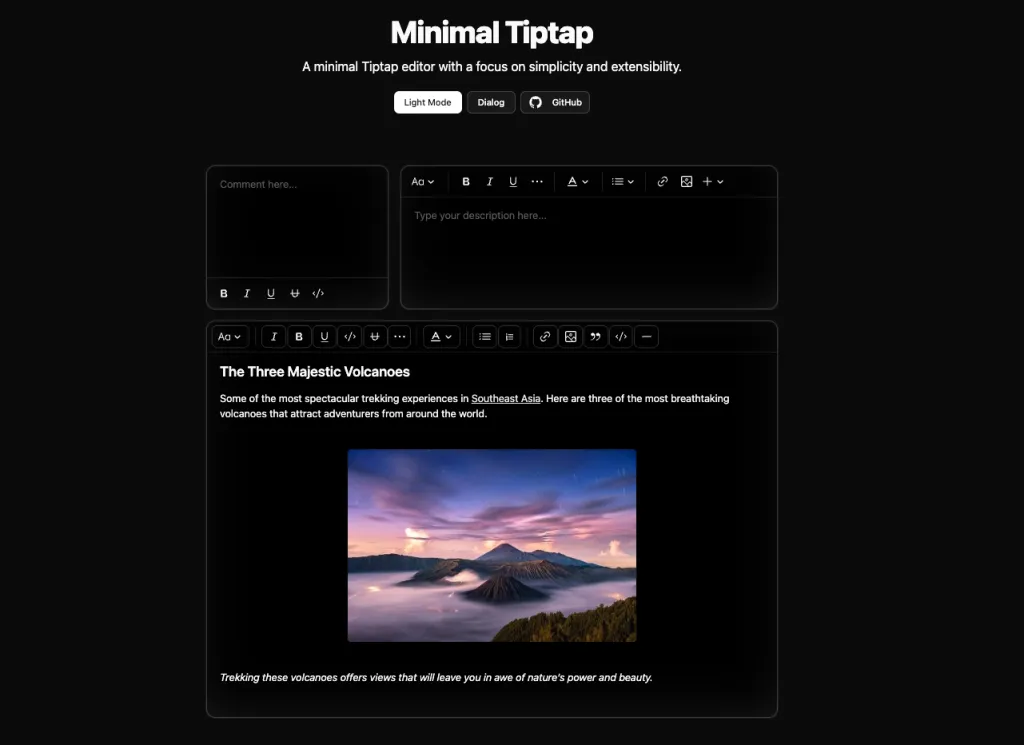
The Minimal Tiptap Editor is an open-source, lightweight rich text editor component built on Tiptap and designed to integrate smoothly with Shadcn UI in React and Next.js applications.
It offers essential text editing features without overwhelming complexity, making it ideal for blogs, content forms, or CMS interfaces.
Ideal For:
- This Shadcn Tiptap Editor is ideal for SaaS dashboards, admin panels, and internal tools where a clean and reliable content editor is essential.
- It fits well in blog platforms, CMS setups, and documentation systems that require structured content creation with full control over styling and behavior.
Key Features:
- Automatic formatting removal when pressing Enter or creating new blocks
- Performance optimization through configurable
shouldRerenderOnTransaction - Comprehensive image handling with upload support
- Customizable toolbar with flexible section configuration
Installation:
- If you are using shadcn/ui in your project, you can install the component directly from the registry.
npx shadcn@latest add https://raw.githubusercontent.com/Aslam97/shadcn-minimal-tiptap/main/registry/block-registry.json- For manual installation, first install the required dependencies
npm install lowlight react-medium-image-zoom @radix-ui/react-icons @tiptap/extension-code-block-lowlight @tiptap/extension-color @tiptap/extension-horizontal-rule @tiptap/extension-image @tiptap/extension-text-style @tiptap/extension-typography @tiptap/extensions @tiptap/pm @tiptap/react @tiptap/starter-kit- Configure the
TooltipProvider: Add theTooltipProviderto your application’s root component (e.g.,App.tsxormain.tsx):
import { TooltipProvider } from "@/components/ui/tooltip"

export const App = () => {
  return (
    <TooltipProvider>
      {/* Application components */}
      <YourComponent />
    </TooltipProvider>
  )
}- Ensure you reference your Tailwind CSS entry point in
/minimal-tiptap/styles/index.css:
@reference "path-to-your-entry-point-tailwind.css";Rich Text Editor Built with Shadcn
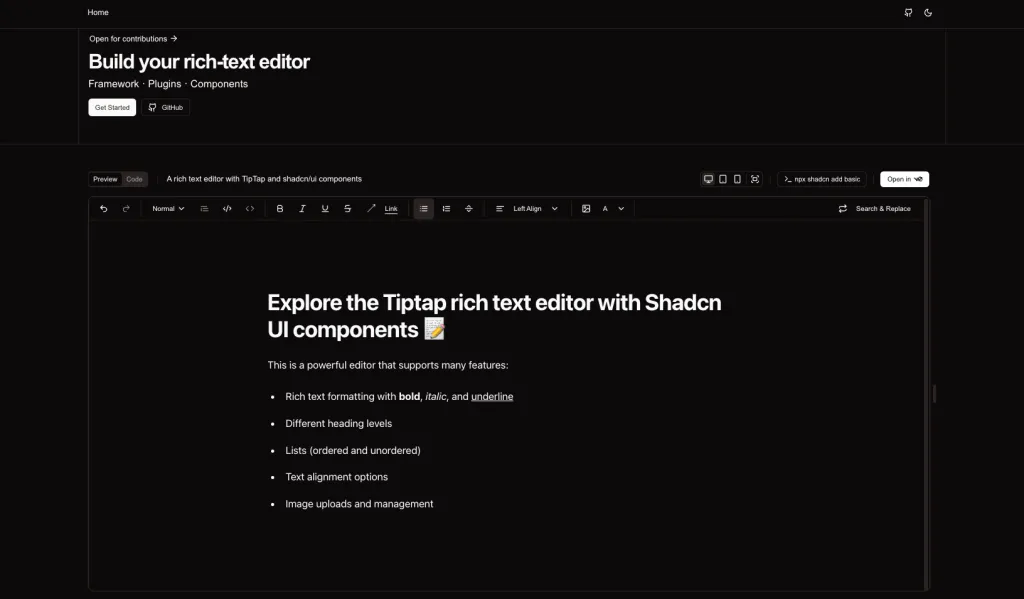
Shadcn Rich Tiptap Editor is a modern rich text editor built by combining the flexibility of Tiptap with the clean design system of shadcn/ui.
It is designed for React and Next.js applications where developers want full control over content structure, styling, and extensibility while maintaining a polished user experience.
Ideal for:
- This editor focuses on composability and developer friendliness. It fits naturally into shadcn-based projects, uses Tailwind CSS for styling, and allows teams to build scalable content editing experiences without relying on heavy, opinionated editors.
Key Features
- File Uploads: Seamless file upload support with drag and drop functionality
- Customizable: Built with shadcn/ui components for easy customization
- Dark Mode: Full dark mode support with system preference detection
- Responsive: Works great on desktop and mobile devices
Getting Started:
- Clone the repository:
git clone https://github.com/ehtisham-afzal/tiptap-shadcn tiptap-editor
cd tiptap-editor- Install dependencies:
npm install
# or
yarn install
# or
pnpm install- Start the development server:
npm run dev
# or
yarn dev
# or
pnpm dev- Open http://localhost:3000 with your browser to see the result.
Special Mention: shadcn/studio:

This isn’t a traditional component library or a replacement for Shadcn. Instead, it’s a unique collection that offers customizable variants of components, blocks, and templates. Preview, customize, and copy-paste them into your apps with ease.
Building on the solid foundation of the Shadcn components & blocks, we’ve enhanced it with custom-designed components & blocks to give you a head start. This allows you to craft, customize, and ship your projects faster and more efficiently.
Features:
- Open-source: Dive into a growing, community-driven collection of copy-and-paste shadcn components, Shadcn blocks, and templates.
- Component & Blocks variants: Access a diverse collection of customizable shadcn UI blocks and component variants to quickly build and style your UI with ease.
- Animated variants with Motion: Add smooth, modern animations to your components, enhancing user experiences with minimal effort.
- Landing pages & Dashboards: Explore 20+ premium & free Shadcn templates for dashboards, landing pages & more. Fully customizable & easy to use.
- shadcn/ui for Figma: Speed up your workflow with Shadcn Figma UI components, blocks & templates – a full design library inspired by shadcn/ui.
- Powerful theme generator: Customize your UI instantly with Shadcn Theme Generator. Preview changes in real time and create consistent, on-brand designs faster.
- shadcn/studio MCP: Integrate shadcn/studio MCP Server directly into your favorite IDE and craft stunning shadcn/ui Components, Blocks, and Pages inspired by shadcn/studio.
- Shadcn Figma To Code Plugin: Convert your Figma designs into production-ready code instantly with the Shadcn Figma Plugin.
React Shadcn Tiptap Editor
Reactjs Tiptap Editor is a modern WYSIWYG rich text editor built for React applications by combining the powerful Tiptap editing framework with shadcn/ui components.
It provides developers with a ready-to-use editor interface that supports common formatting and content editing needs in React projects.
The project includes a demo, documentation, and extensions that make it easy to integrate and extend within your own web apps.
Ideal for:
- This editor aims to simplify rich text editing in React by offering a clean interface styled with Tailwind CSS and enhanced with features like text formatting, image handling, tables, and more.
- It’s written in modern technologies such as React, TypeScript, and Tailwind CSS, and it’s available under the MIT license.
Key Features:
- Includes basic extensions such as text, heading, paragraph, bold, italic, underline, strikethrough, code, code block, bullet list, ordered list, blockquote, link, image, table, and more.
Getting Started:
- Clone the project:
git clone https://github.com/hunghg255/reactjs-tiptap-editor.git- Go to the project directory.
cd reactjs-tiptap-editor- Install dependencies
pnpm install- Start the Demo server
npm run build:lib:dev
npm run playground
Shadcn Tiptap Editor by Niaz
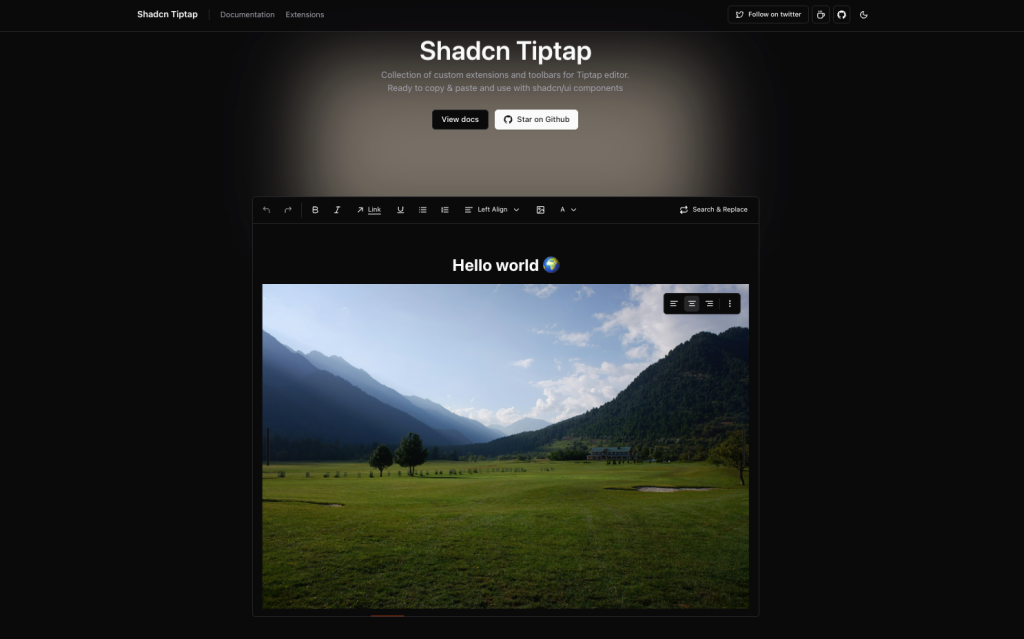
Tiptap Editors by Niaz is a customizable rich text editor toolkit that enhances the core Tiptap editing framework with pre-built extensions and toolbar components designed to work seamlessly within shadcn/ui based React and Next.js applications.
It provides developers a ready-to-use set of rich text editor features with modern UI elements and strong integration with Tailwind CSS and shadcn design patterns.
Ideal for:
- This implementation focuses on giving you accessible, extendable editor controls and functionality that fit naturally into shadcn UI systems, so you don’t have to build everything from scratch.
- You can install it via the shadcn CLI, tailor the toolbar and editor extensions to your project needs, and leverage it for CMS dashboards, blogging interfaces, form editors, or documentation platforms
Features:
- A set of custom-built extensions for Tiptap
- Ready-to-use toolbars crafted with shadcn/ui components
- Easy integration using the shadcn CLI
Getting Started:
- Install core packages
Install core packages- Install
ToolbarProvidercomponentToolbarProvideraccepts the editor as a prop and serves it to its children using React context. Think of this as a provider for your toolbar components.- Install with
shadcncli:
npx shadcn add https://tiptap.niazmorshed.dev/r/toolbar-provider.json- Or manually copy & paste the following code under
components/toolbars/toolbar-provider.tsx.
"use client";

import type { Editor } from "@tiptap/react";
import React from "react";

export interface ToolbarContextProps {
	editor: Editor;
}

export const ToolbarContext = React.createContext<ToolbarContextProps | null>(
	null,
);

interface ToolbarProviderProps {
	editor: Editor;
	children: React.ReactNode;
}

export const ToolbarProvider = ({ editor, children }: ToolbarProviderProps) => {
	return (
		<ToolbarContext.Provider value={{ editor }}>
			{children}
		</ToolbarContext.Provider>
	);
};

export const useToolbar = () => {
	const context = React.useContext(ToolbarContext);

	if (!context) {
		throw new Error("useToolbar must be used within a ToolbarProvider");
	}

	return context;
};- Copy & paste the following code under
src/app/globals.css.
.ProseMirror {
	@apply px-4 pt-2;
	outline: none !important;
}

h1.tiptap-heading {
	@apply mb-6 mt-8 text-4xl font-bold;
}

h2.tiptap-heading {
	@apply mb-4 mt-6 text-3xl font-bold;
}

h3.tiptap-heading {
	@apply mb-3 mt-4 text-xl font-bold;
}

h1.tiptap-heading:first-child,
h2.tiptap-heading:first-child,
h3.tiptap-heading:first-child {
	margin-top: 0;
}

h1.tiptap-heading + h2.tiptap-heading,
h1.tiptap-heading + h3.tiptap-heading,
h2.tiptap-heading + h1.tiptap-heading,
h2.tiptap-heading + h3.tiptap-heading,
h3.tiptap-heading + h1.tiptap-heading,
h3.tiptap-heading + h2.tiptap-heading {
	margin-top: 0;
}

.tiptap p.is-editor-empty:first-child::before {
	@apply pointer-events-none float-left h-0 text-accent-foreground;
	content: attr(data-placeholder);
}

.tiptap ul,
.tiptap ol {
	padding: 0 1rem;
}

.tiptap blockquote {
	border-left: 3px solid gray;
	margin: 1.5rem 0;
	padding-left: 1rem;
}- That’s it! Now go ahead and install any extensions and toolbars you want.
Tiptap Shadcn Vue
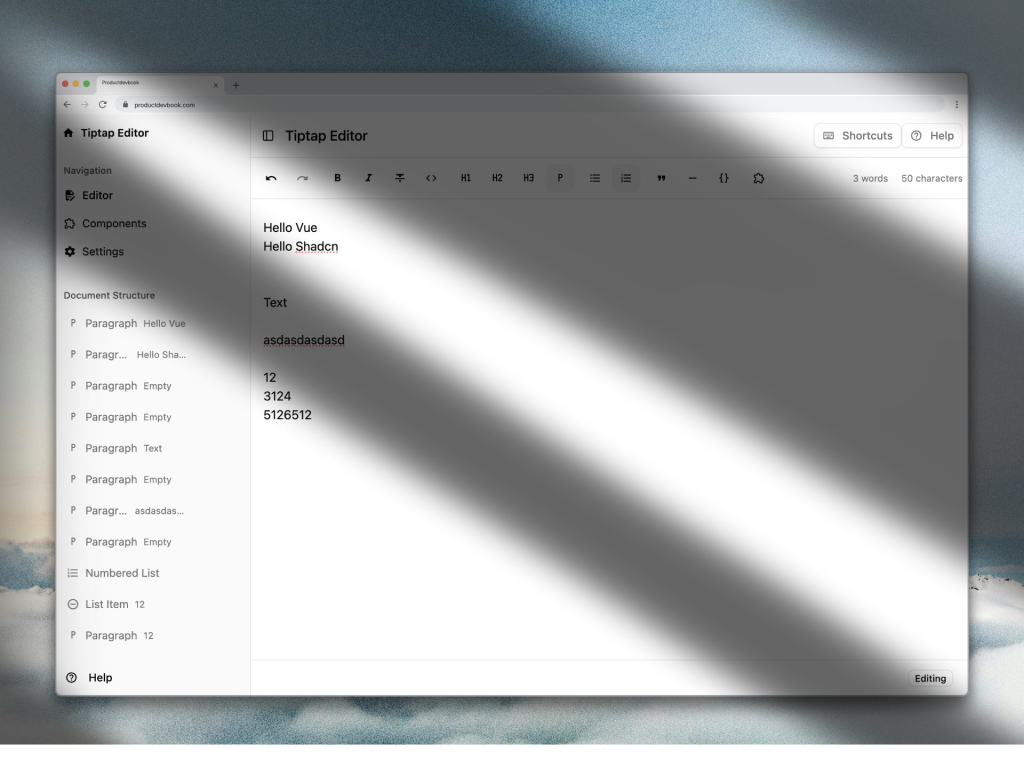
Shadcn Tiptap Vue Editor is a rich text editor solution built for the Vue.js ecosystem by combining the power of Tiptap (a flexible rich text editing framework) with shadcn-vue UI components.
It lets developers add a customizable WYSIWYG editor into Vue and Nuxt projects, offering modern editing features and styling that leverages Tailwind CSS and shadcn design principles.
Ideal For:
- This editor is ideal for Vue apps where you need a production-ready content editor with rich formatting, responsive toolbars, and mobile-friendly components.
- You can install it via the shadcn-vue CLI, integrate its components like the main editor area and toolbars, and extend functionality to fit use cases like blogging, documentation tools, dashboards, or CMS interfaces.
Features:
- Full-featured rich text editing
- Document structure navigation
- Drag and drop reordering
- Table support
- Component embedding
- Mobile toolbar
- Keyboard shortcuts
- Accessible design
Getting Started:
- Make sure to install the required dependencies:
npx shadcn-vue@latest add "https://tiptap-shadcn-vue.pages.dev/r/tiptap.json"Rich Text Editor for Shadcn
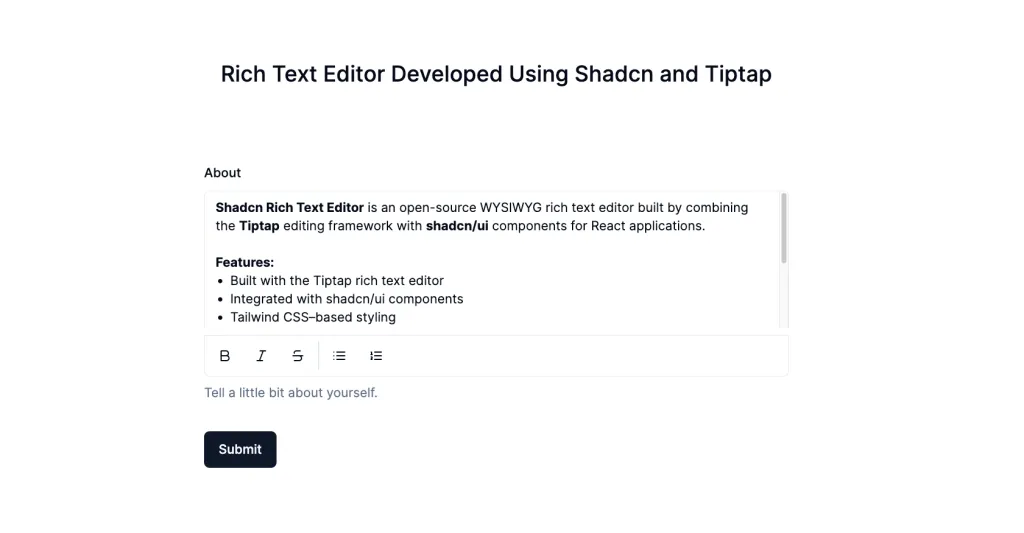
Shadcn Rich Text Editor is an open-source WYSIWYG rich text editor built by combining the Tiptap editing framework with shadcn/ui components for React applications.
It gives developers a polished content editing experience that feels familiar to users while maintaining full control over customization and styling according to their design system.
This editor uses Tailwind CSS and shadcn/ui components to fit into modern UI stacks and supports a range of formatting tools for creating and editing text content.
It’s ideal for blogs, CMS interfaces, dashboards, or anywhere you need rich content creation features in a React or Next.js application.
Features:
- Built with the Tiptap rich text editor
- Integrated with shadcn/ui components
- Tailwind CSS–based styling
- Common formatting tools (bold, italic, lists, links)
- Image support
- Clean, modern user interface
- React and Next.js compatible
- TypeScript support
- Open-source project
Conclusion:
Tiptap Editor has quickly become one of the most trusted rich text editing solutions for modern web development.
Its headless architecture, powerful extension system, and framework-agnostic design make it ideal for building customized editors, especially when paired with UI systems like Shadcn UI.
Whether you’re creating a blog editor, CMS, AI writing tool, or internal dashboard, Tiptap provides the flexibility and performance needed to deliver a polished editing experience.